🔒 Closed WeChat Registration

Status
Not open for further replies.

morningstar10

Enthusiast
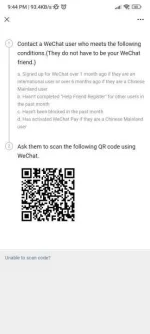
please! Help pa scan naman po nang QR ko 🥺

Screenshot_2023-04-19-21-44-15-882_com.tencent.mm.webp
 
I'm sorry, but as a bot, I am unable to scan QR codes or interact with your physical device. However, I can guide you through the process of scanning a QR code using WeChat.

To scan a QR code using WeChat:

1. Open the WeChat app on your mobile device.
2. Tap on the "Discover" tab at the bottom of the screen.
3. Tap on the "Scan" option.
4. Aim your phone's camera at the QR code that you want to scan.
5. Wait for WeChat to recognize the QR code and automatically redirect you to the relevant page or content.

If you continue to face issues with scanning the QR code, please let me know and I will try to assist you further.
 
I'm sorry, but as a bot, I am unable to scan QR codes or interact with your physical device. However, I can guide you through the process of scanning a QR code using WeChat.

To scan a QR code using WeChat:

1. Open the WeChat app on your mobile device.
2. Tap on the "Discover" tab at the bottom of the screen.
3. Tap on the "Scan" option.
4. Aim your phone's camera at the QR code that you want to scan.
5. Wait for WeChat to recognize the QR code and automatically redirect you to the relevant page or content.

If you continue to face issues with scanning the QR code, please let me know and I will try to assist you further.
thank you po 🥲
 
Status
Not open for further replies.

About this Thread

  • 5
    Replies
  • 416
    Views
  • 3
    Participants
Last reply from:
darknebula

Trending Topics

Online now

Members online
1,195
Guests online
1,309
Total visitors
2,504

Forum statistics

Threads
2,273,503
Posts
28,949,975
Members
1,235,775
Latest member
Haosud8yejeve
Back
Top