🔒 Closed Google app password is not working (Gagamitin kasing SMTP sa system na ginagawa ko)

Status
Not open for further replies.

PHC_Joe

Eternal Poster
May ginagawa po kasi akong system (para po sa Capstone namin) na may email verification bago makalogin. Nagawa ko na po sya last week at gumagana na po sya, pero nung tinest ko ulit kanina ayaw na. Invalid email na yung lumalabas. Tingin ko po sa email at password sa code yung problem. After ng mahabang oras na debugging, sa app password po pala yung problema, ayaw na gumana ng app password na generated ni google. Gumawa na rin po ako ng bagong generated app password pero ayaw pa rin nya gumana. Pahelp naman po kung ano pwede gawin 😞

eto po yung code, sa password po yung problema. Ayaw po tanggapin ni google yung new generated app password 😔
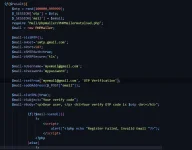
1679664536010.webp


1679664523152.webp
 
Hello! I understand that you are having trouble with your system that requires email verification before logging in, and you suspect that the issue lies with the email and password in your code. You have also generated a new app password but it still doesn't work.

First, make sure that you are using the correct email and password in your code. Double-check the spelling and make sure there are no typos.

If you are sure that the email and password are correct, you can try the following solutions:

1. Check if your Google account has two-factor authentication enabled. If it does, you need to generate an app password specifically for the application you are using. Make sure to use the correct app name when generating the app password.

2. Make sure that the app password you generated is for the correct Google account. If you have multiple Google accounts, you may have generated an app password for the wrong account.

3. Try clearing your browser cache and cookies, and then generate a new app password. This may help in case the issue is caused by a cached version of the app password.

4. If none of the above solutions work, you can try resetting your Google account password and then generating a new app password. This may help in case the issue is caused by a problem with your Google account.

I hope these solutions help you resolve the issue. Let me know if you need any further assistance.
 
post mo din dito yung solution mo para makatulong din sa iba na makaka encounter ng same sa case mo ts.
Sa may same problem po. Di na po gmail yung ginamit ko. Zoho mail po yung ginamit ko at ayun gumana 😊 signup lang po kayo dito > You do not have permission to view the full content of this post. Log in or register now. tas generate password same lang sa google account then yung baguhin nyo lang po yung $mail -> Host = 'smtp.zoho.com'; tas lagay nyo na yung email at generated pass galing kay zohomail. Gumana po sakin yan 😁 Di ko nga alam bat ayaw sa gmail eh. Yung tinry ko sa zohomail gumana na 😄
 
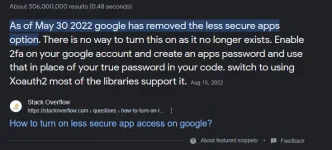
Hello. Gmail will no longer support that PHP mailer using smtp. Kase wala na sa settings mo yung less secure apps option unless naka gsuit ka andyan pa yan. Pero may other pa naman na magamit si Gmail sa phpmailler basahin mo lang yung Documentation ni PHPMailer sa github.
For Reference:
1679905951008.webp
 
Status
Not open for further replies.

About this Thread

  • 6
    Replies
  • 836
    Views
  • 4
    Participants
Last reply from:
_Moira

Trending Topics

Online now

Members online
340
Guests online
1,142
Total visitors
1,482

Forum statistics

Threads
2,272,179
Posts
28,940,780
Members
1,238,060
Latest member
aaaaaaaaaaaaaaaaaaaaaaaaa
Back
Top