 PH
PHKenLee_ubnt
Leecher
Install browser extension FireMonkey or Tampermonkey
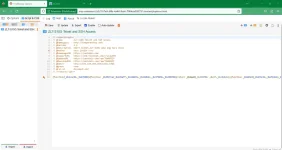
import ZLT-S10G Telnet and SSH Access script
Login to the user account (user/l03e1t3) and navigate to the You do not have permission to view the full content of this post. Log in or register now..
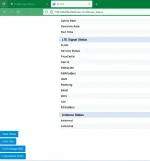
Look at the bottom left corner of the screen, there should be a big (“Start Telnet” and “Start SSH”) button, if not enter 192.168.254.254 on the address bar again.
Click the two buttons and now you can telnet/ssh to the device.
To access the telnet, download a telnet Client like puTTY or just use the built in Windows telnet client:
telnet 192.168.254.254
There is no password authentication.
To access the ssh, you can also use the built in Windows SSH client or download puTTY.
file link:
You do not have permission to view the full content of this post. Log in or register now.
import ZLT-S10G Telnet and SSH Access script
Login to the user account (user/l03e1t3) and navigate to the You do not have permission to view the full content of this post. Log in or register now..
Look at the bottom left corner of the screen, there should be a big (“Start Telnet” and “Start SSH”) button, if not enter 192.168.254.254 on the address bar again.
Click the two buttons and now you can telnet/ssh to the device.
To access the telnet, download a telnet Client like puTTY or just use the built in Windows telnet client:
telnet 192.168.254.254
There is no password authentication.
To access the ssh, you can also use the built in Windows SSH client or download puTTY.
file link:
You do not have permission to view the full content of this post. Log in or register now.
 bat nasira