 PH
PH-
Welcome to PHCorner Forums! Sign up for free to unlock full access and exclusive privileges, including:
- Asking questions about computer and mobile issues
- Discovering internet tips for your mobile network and computer
You are using an out of date browser. It may not display this or other websites correctly.
You should upgrade or use an alternative browser.
You should upgrade or use an alternative browser.
- Status
- Not open for further replies.
🤖
🤖
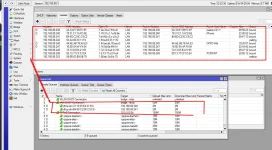
Yes, you can automatically add all DHCP clients to the Simple Queue on MikroTik RouterOS by following these steps:
1. Go to IP > DHCP Server and select the DHCP server you want to configure.
2. Under the DHCP Server settings, click on the "Script" tab.
3. Click on the "Add" button to create a new script.
4. Enter the following command in the "Source" field:
5. Click on "OK" to save the script.
This script will automatically create a new Simple Queue for each DHCP client that connects to the network with a bandwidth limit of 1Mbps download and 1Mbps upload.
Note: Make sure to test the script and adjust the bandwidth limits to the appropriate values for your network. Also, keep in mind that this method may not work for networks with a large number of DHCP clients or complex network setups.
1. Go to IP > DHCP Server and select the DHCP server you want to configure.
2. Under the DHCP Server settings, click on the "Script" tab.
3. Click on the "Add" button to create a new script.
4. Enter the following command in the "Source" field:
/queue simple add name=client-${lease-hostname} target-addresses=${lease-address} max-limit=1M/1M5. Click on "OK" to save the script.
This script will automatically create a new Simple Queue for each DHCP client that connects to the network with a bandwidth limit of 1Mbps download and 1Mbps upload.
Note: Make sure to test the script and adjust the bandwidth limits to the appropriate values for your network. Also, keep in mind that this method may not work for networks with a large number of DHCP clients or complex network setups.
- Status
- Not open for further replies.
About this Thread
-
1Replies
-
1KViews
-
1Participants
Last reply from:
Unknown user
Unknown user
New Topics
-
Converge EG8021V5 5G and LAN disabled.
- Started by jayjay_21
- Replies: 2
- ❓ Internet Questions
-
ᑕᕼᗩTGᑭT Plus Subscritption with atleast 5-45 hour usage limit
- Started by kyl311
- Replies: 1
- ❓ Internet Questions
-
Certification Exam Dumps?
- Started by keepitfun
- Replies: 0
- ❓ Internet Questions
-
Xperience Hub Tv box
- Started by XxSpongebobxX
- Replies: 0
- ❓ Internet Questions
-
Bida fiber zte admin account
- Started by PHC-Warning
- Replies: 0
- ❓ Internet Questions
-
Help b315s-938 po mga boss
- Started by thosamad12
- Replies: 0
- ❓ Internet Questions
-
Piso wifi no hulog
- Started by Grovey3
- Replies: 0
- ❓ Internet Questions
-
Asking kung unli ba talaga ang pldt prepaid fiber?
- Started by Joshua0821
- Replies: 2
- ❓ Internet Questions
-
Looking for outdoor Ethernet cable
- Started by rjackdaw
- Replies: 2
- ❓ Internet Questions
-
GlobeatHome HG6145D2 as extender
- Started by mac_dah
- Replies: 0
- ❓ Internet Questions
Trending Topics
Online now
- Members online
- 1,074
- Guests online
- 7,373
- Total visitors
- 8,447