 PH
PHHdiahs682h
Honorary Poster
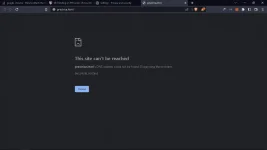
baguhan lang po nag install po ako visual studio code for html paano po mag fix yan pag pina run ko yan lumabas. brave browser po pala ginamit ko.
yung mismong index.html ang iopen mo sa live server. right click mo yung index.html sa vscode, then open live server.View attachment 2540047
na gets kuna po kong papano, paano po para hindi na po mag copy paste ning path? yan po pa gamit ng live server?
View attachment 2540068
bakit po ito yung lumabas pagpindot ko ng open live server? ito po yung destop files ko, hindi po yung ginwa ko.
saan po yan makikita yung file explorer lods? paano po yan e fix?iba po lods ang url pag local file gamit mo. double click mo sa file explorer yung html file lodicakes tapos tingnan mo po sa browser url niya
right click mo yung index.html sa vscodesaan po yan makikita yung file explorer lods? paano po yan e fix?
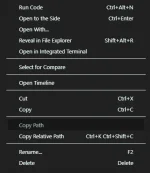
right click mo yung index.html sa vscode
click mo yung copy path. then paste mo sa URL ng browser mo.
View attachment 2540032
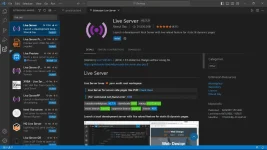
Pwede ka din gumamit ng Live Server extension.
Name: Live Server
Id: ritwickdey.LiveServer
Description: Launch a development local Server with live reload feature for static & dynamic pages
Version: 5.7.9
Publisher: Ritwick Dey
VS Marketplace Link: You do not have permission to view the full content of this post. Log in or register now.
yung mismong index.html ang iopen mo sa live server. right click mo yung index.html sa vscode, then open live server.View attachment 2540047
na gets kuna po kong papano, paano po para hindi na po mag copy paste ning path? yan po pa gamit ng live server?
View attachment 2540068
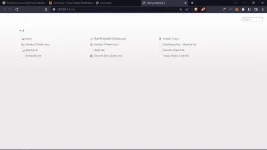
bakit po ito yung lumabas pagpindot ko ng open live server? ito po yung destop files ko, hindi po yung ginwa ko.