 PH
PH-
Welcome to PHCorner Forums! Sign up for free to unlock full access and exclusive privileges, including:
- Asking questions about computer and mobile issues
- Discovering internet tips for your mobile network and computer
You are using an out of date browser. It may not display this or other websites correctly.
You should upgrade or use an alternative browser.
You should upgrade or use an alternative browser.
👨🏫 Tutorial Making your own *.ehi configuration for http injector
johncelpallasigueGrande
Journeyman
ano to boss no load no promo
Salamat ng maramiMarami na pong tut nito, pero makikisali na din ako
Kung marami ng reporters damihan na din natin creators para may laban tayo!
Step 1:
download muna kayo ng "HTTP Injector" sa Playstore.
View attachment 65260
Step 2:
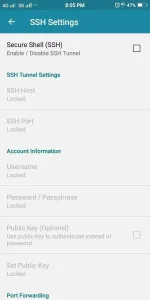
SSH Settings, gawa muna kayo dito ng ssh account nyo:
You do not have permission to view the full content of this post. Log in or register now.
You do not have permission to view the full content of this post. Log in or register now.
You do not have permission to view the full content of this post. Log in or register now.
You do not have permission to view the full content of this post. Log in or register now.
At marami pang iba.
Para sa akin mas ok sakin sila server Singapore, Japan at Germany.
Sample ng gawa sa tcpvpn:
View attachment 66140
View attachment 65274
Tapos input nyo na sya sa SSH Settings ng Http Injector.
Default port nyan ay:
22
443
80
Pili nalang kayo kung ano gagana
(Mas ok kung yung IP ang ilalagay nyo sa SSH Host. Minsan kasi ayaw kumagat kapag hostname)
View attachment 65276
Step 3:
Now goto Payload Generator tapos setup nyo sya ng ganito.
(Ang URL/Host o Proxy Server ay ang bugsite, na karaniwan natin ginagamit sa psiphon settings. Ito yung kinakatay!)
Mas OK kung susubukan nyo muna sa Psiphon yung Proxy Server na gagamitin nyo sa pag-create na ehi.
Para sure na alive pa.
Katay na si h.phcorner.org/#forbidden# so kayo na bahala humanap ng pamalit
Sundin ang pag-iinput from 1 to 8.
200(OK) Setup
(For Smart/TNT/Sun)
View attachment 71019
Code:POST http://h.phcorner.org/#forbidden#/ HTTP/1.1[crlf]Host: h.phcorner.org/#forbidden#[crlf]X-Online-Host: h.phcorner.org/#forbidden#[crlf]X-Forward-Host: h.phcorner.org/#forbidden#[crlf]Connection: Keep-Alive[crlf][crlf][split]CONNECT [host_port]@h.phcorner.org/#forbidden# [protocol][crlf][crlf]
Connection Established Setup
(For Smart/TNT/Sun)
View attachment 71020
Code:CONNECT [host_port] HTTP/1.1[crlf][crlf]PUT http://h.phcorner.org/#forbidden#/ [protocol][crlf]Host: h.phcorner.org/#forbidden#[crlf]CONNECT [host_port] [protocol][crlf][crlf]
Globe/TM Default with Promo
View attachment 79180
Code:CONNECT [host_port] [protocol][crlf]Host: m.phcorner.org/#forbidden#[crlf]X-Forward-Host: m.phcorner.org/#forbidden#[crlf]Connection: Keep-Alive[crlf][crlf]
CE Fast Connect Tips
Kailangan kung anong server nung proxy remote nyo at sya ring server ng ssh account nyo, para mas mabilis magconnect si Connection Established.
Sample:
Remote Proxy = Singapore
SSH Server = Singapore
Step 4:
para naman sa Remote Proxy.
For begginers:
Gamitin nyong remote proxy ang SSH Host IP sa pinagcreatan nyo ng SSH Account.
Na may Default Port na
80 / 81 / 8080
View attachment 71074
For advance learners:
Kung gusto nyo talaga humataw ang gawa nyo hanap kayo dito ng Remote Proxy nyo.
You do not have permission to view the full content of this post. Log in or register now.
You do not have permission to view the full content of this post. Log in or register now.
You do not have permission to view the full content of this post. Log in or register now.
At marami pang iba.
Tyagaan ang paghahanap ng hataw na proxies, trial and error lang.
tapos check Google DNS.
Step 5:
test nyo muna kung gagana.
View attachment 65283
Then kapag working na gawang mong ehi. Ready to export na yan.
Piliin nyo nalang dyan gustong nyo lock o unlock. pwede nyo dyan i-set yung expiry ng ehi at availability sa pocket wifi.
View attachment 65284
So yun lang po noh. Nakagawa ka na ng ehi mo
Ang saya di ba?
Found this thread usefulompous:?
Or still not enough to earn the like?
Maraming salamat nga po pala sa mga nagmemention sa first ehi nila!
Sa mga di parin makapagpagana, post nyo po ang screenshots ng LOGS at HOME baka magawan natin yan ng paraan
You might also like LESSON 101: Proper pingging NO DC HTTP Injector / Eproxy using Pingtools prô
https://phcorner.org/t/lesson-101-proper-pingging-no-dc-injector.158079/


Emmpeelight
Eternal Poster
Keep sharing paps!
Master_Pogi21
Journeyman
Thanks po.

TUN4-0M3L3T
Honorary Poster
Guys may config ba kau for giga 50 ng tnt na mauuna maubos ung free1gb per day na dor youtube.
1Nathaniel
Enthusiast
Thanks TS. Working ba ito sa FLP ng sun
daffyman20
Leecher
Ang tagal na ng tutorial pero salamat parin paps
Cyberkiller_11
Fanatic
thanks sa tut.
darkcosmos
Leecher
thanks pa try..
ChuckY DolL
Elite
walang Host/Payload
di rin kami makakaconnect
pabulong na lang po sa sun sir
di rin kami makakaconnect
pabulong na lang po sa sun sir
Similar threads
-
🏷️ For Sale OPEN FOR MAKING YOUR OWN BOOSTING SITE
- Started by Izzy Shop
- Replies: 12
About this Thread
-
4KReplies
-
507KViews
-
3KParticipants
Last reply from:
mamiaub
mamiaub
New Topics
-
Power all tiktok ,saya all ,unlidata to our ρáíd vpn 50 a month no ads
- Started by amber vpn
- Replies: 0
- 📶 Smart & TNT
-
TNT Data extension?
- Started by Mad Engineer
- Replies: 1
- 📶 Smart & TNT
-
TIKTOK | FREEBIES | (26-10-11) Netmod
- Started by Calcifeer
- Replies: 1
- 📶 Smart & TNT
-
FREE 50,000 AI credits from SMART.AI
- Started by CodeZeroPH
- Replies: 2
- 📶 Smart & TNT
-
Unli data promo
- Started by mirag3
- Replies: 0
- 📶 Smart & TNT
-
Free access Ai ni Smart
- Started by Red heyven
- Replies: 0
- 📶 Smart & TNT
-
-
Trending Topics
-
-
Oct.10 Sts unlidata data bypass/saya all /power all/ unli tiktok/ for ios Android Pc
- _-_-LhOnZ-_-_
Replies: 15 -
Oct.05 Sts unlidata data bypass/saya all /power all/ unli tiktok/ for ios Android Pc
- _-_-LhOnZ-_-_
Replies: 21 -
Oct.08 Sts unlidata data bypass/saya all /power all/ unli tiktok/ for ios Android Pc
- _-_-LhOnZ-_-_
Replies: 15 -
-
-
Oct.12 Sts unlidata data bypass/saya all /power all/ unli tiktok/ for ios Android Pc
- _-_-LhOnZ-_-_
Replies: 7 -
-
Oct.01 Sts unlidata data bypass/saya all /power all/ unli tiktok/ for ios Android Pc
- _-_-LhOnZ-_-_
Replies: 24 -
Oct.03 Sts unlidata data bypass/saya all /power all/ unli tiktok/ for ios Android Pc
- _-_-LhOnZ-_-_
Replies: 15
Online now
- Members online
- 361
- Guests online
- 7,505
- Total visitors
- 7,866