 PH
PHHi!! Welcome To My Thread
For Unlocked Bootloader Phones only!!
Proceed With Caution!!
What is rooting? Rooting is a process that allows you to attain root access to the Android operating system code (the equivalent term for Apple devices is jailbreaking). It gives you privileges to modify the software code on the device or install other software that the manufacturer wouldn't normally allow you to.
Requirements:
mtk/mediatek Phone
You do not have permission to view the full content of this post. Log in or register now.
You do not have permission to view the full content of this post. Log in or register now.
You do not have permission to view the full content of this post. Log in or register now.
You do not have permission to view the full content of this post. Log in or register now.
You do not have permission to view the full content of this post. Log in or register now.
This method is also effective for firmwares that has not been publicly released.
Download Mtk Client,.
Download and Install libUSB; USBDK; python & All in one Drivers .
To extract the currently flashed vbmeta.img & boot.img partition from your phone, we can use the Mtk Client.
Step 1: Install your MTK PORT to libUSB
Go to Mtk Client directory click, its path and type cmd/ cmd inside its path.
-->Turn Off Phone, type this command,
Code:
python mtk payloadopen LibUSB or search Filter Wizard in your windows search bar
-->click next, power off phone hold vol - and + connect your phone to PC,
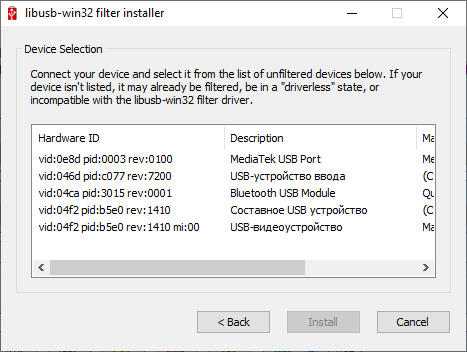
, & install your mtk usb port.
Step 2: Extracting boot.img & vbmeta.img
-->Type this in cmd.
Code:
python mtk r boot,vbmeta boot.img,vbmeta.img
Code:
python mtk resetStep 3: Install magisk and ρá†ch the boot.img
install-->You do not have permission to view the full content of this post. Log in or register now.
Open Magisk
-->click install
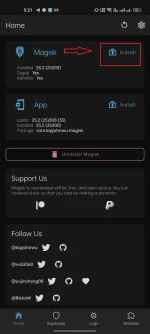
--> choose Select a ρá†ch FIle

--> select the boot.img you extracted
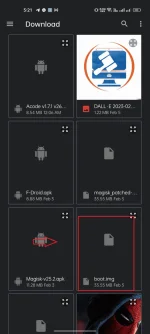
-->Finished!!

copy and paste magisk_patched-XXXXX.img into your PC/computer.
__________________________________________________________________________________________________________________
Step 4: Flashing disabled vbmeta.img & pached magisk_patched-xxxxx.img
Reboot your phone into fastboot mode/bootloader.
You can also do this via ADB just enable usb debugging" adb reboot bootloader".
--> Download You do not have permission to view the full content of this post. Log in or register now.You do not have permission to view the full content of this post. Log in or register now.and extract.
cmd inside.
Once the phone has entered fastboot, connect the phone to pc.
Code:
fastboot --disable-verity --disable-verification flash vbmeta "drag your extracted vbmeta.img from your mtk client"
Code:
fastboot flash boot "drag magisk_patched-xxxxx.img that you copied from your phone"
Code:
fastboot reboot"You can also use the MTK client to back up your IMEI partitions or even create a flashable firmware of your phone."
"When we share, everyone wins."