 PH
PHREQUIREMENTS
- Vim
- PHP
- Apache2
- Php-apache
- Phpmyadmin
- MariaDB
INSTALLATION
-> pkg update && pkg upgrade -y
-> termux-setup-storage
-> pkg install vim
-> pkg install php
-> pkg install apache2
-> pkg install php-apache
-> pkg install phpmyadmin
-> pkg install mariadb
HTTPD.CONF SET-UP
-> cd $PREFIX/etc/apache2
-> vim httpd.conf
// At line 66 add php_module

LoadModule php_module libexec/apache2/libphp.so
// At line 67 uncomment mpm_prefork_module by removing # sign

// At line 68 comment mpm_worker_module by putting # sign

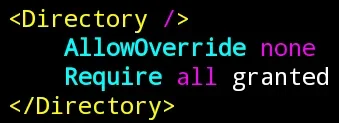
// At line 231, change DENIED to GRANTED
Ex.// Locate your internal storage folder to set as an Apache2 web directory
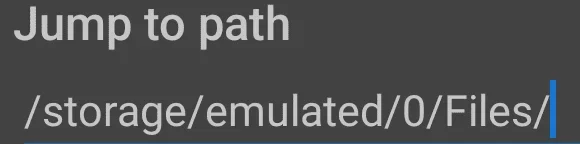
PS. Dito ka ilalagay ang mga source code mo
// At line 246 and 247 paste the path of your folder

// At line 505 uncomment virtual hosts

// At line 533 add handler to read PHP

<FilesMatch \.php$>
SetHandler application/x-httpd-php
</FilesMatch>
// At the bottom, line 541, include php_module config

Include etc/apache2/extra/php_module.conf
Save
HTTPD-VHOSTS.CONF SET-UP
-> cd extra// I assume that you're still in this directory $PREFIX/etc/apache2
-> touch php_module.conf
-> vim httpd-vhosts.conf
For First Virtual Host
// At line 25, DocumentRoot. Paste the path of your Apache2 web directory
// At line 26, ServerName. Set it as LOCALHOST
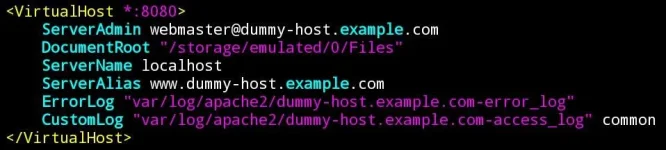
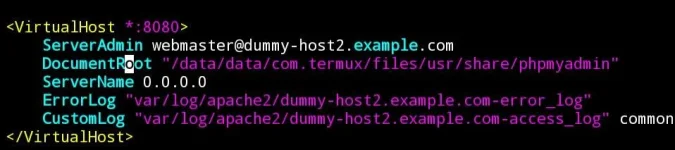
For Second Virtual Host
Default Path:// At line 34, DocumentRoot. Paste the path of PhpMyAdmin
/data/data/com.termux/files/usr/share/phpmyadmin
// At line 35, ServerName. Set it as 0.0.0.0
Save
CONFIG.INC.PHP SET-UP
-> cd ~
-> cd $PREFIX/share/phpmyadmin
-> vim config.inc.php
// At line 16, set blowfish_secret

To get blowfish secret: You do not have permission to view the full content of this post. Log in or register now.
// At line 30, Host. Set it as 127.0.0.1

// At line 148, SendErrorReports. Set it to NEVER

Save
CREATING PHPMYADMIN ACCOUNT
-> cd ~
-> clear
-> mysqld_safe -u root
-> ctrl + z to stop
-> mysql -u root
-> USE mysql;
-> CREATE USER 'You'reUserName'@'localhost' IDENTIFIED BY 'PasswordMo';
-> GRANT ALL ON ASTERISK.ASTERISK TO 'You'reUserName'@'localhost' WITH GRANT OPTION;
-> flush privileges;// Symbol ng ASTERISK ha
-> quit
-> clear
TO OPEN APACHE2 WEB
-> httpd
-> localhost:8080// Now go to your browser and type
-> killall -9 httpd// To stop Apache2
TO OPEN PHPMYADMIN
-> mysqld_safe -u YourUserName -p
-> 0.0.0.0:8080// Now go to your browser and type
LOGIN YOUR ACCOUNT
-> killall -9 mysqld// To stop PhpMyAdmin
BOOM SABOGGGGG CP MO

Kidding

Pag nakaabot kayo dito may isang error dyan, may solution nmn po hehe. Itanong nyo nlng kung HOW sa comment section.