 PH
PHIntroduction
Sa mga hindi pa nakakaalam kung ano vowifi or wifi calling . Ang wifi calling ay ginagamit para maka send or receive ng text/call kahit walang signal sa isang lugar.. paano ito gumagana ? gumagana ang wifi calling kapag naka connect ka sa Wi-Fi.
How to activate may two step tayo una sa phone settings ng ating mga phone pangalawa through network provider need natin ipa activate ang volte at vowifi/ wifi calling
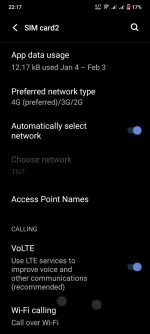
Enable through phone settings
Go to settings and find Network and internet> sim card and mobile network >sim card info> select sim1 or sim 2 > Enable wifi calling and video calling
Download MY PLDT SMART in playstore then sign in
Follow the step below with photo instructions
Download

Step 1 click view account

Step 2: Manage account

Step 3: select Help ticket
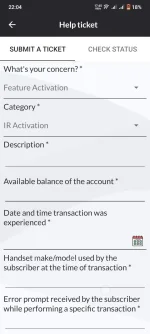
Step4: select technical and video call or quality
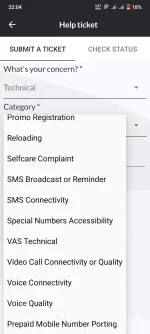
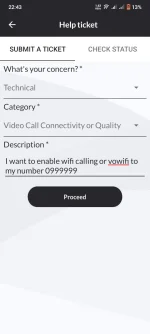
Step 5 : wait less than 10hours then after that my ma rerecieve kang text na activated na ang vowifi at volte
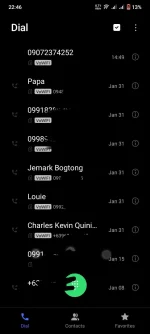
Sa mga hindi pa nakakaalam kung ano vowifi or wifi calling . Ang wifi calling ay ginagamit para maka send or receive ng text/call kahit walang signal sa isang lugar.. paano ito gumagana ? gumagana ang wifi calling kapag naka connect ka sa Wi-Fi.
How to activate may two step tayo una sa phone settings ng ating mga phone pangalawa through network provider need natin ipa activate ang volte at vowifi/ wifi calling
Unang paraan : ALL NETWORKS
Enable through phone settings
Go to settings and find Network and internet> sim card and mobile network >sim card info> select sim1 or sim 2 > Enable wifi calling and video calling
Pangalawang paraan
SMART AND TNT ONLYDownload MY PLDT SMART in playstore then sign in
Follow the step below with photo instructions
Download
Step 1 click view account
Step 2: Manage account
Step 3: select Help ticket
Step4: select technical and video call or quality
Step 5 : wait less than 10hours then after that my ma rerecieve kang text na activated na ang vowifi at volte
