 PH
PH
Introduction to Hassle Free Image Compression
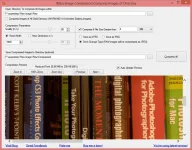
When do you need it?
Situation 1, Posting Images over Internet: You are just back for an exiting trip. You’ve just dump all pics from your camera to your computer and now you want to e-mail to you friend or Upload to your blog. Clearly, you can do that because of image size on the disk will be huge. This is because these images are optimized for clear printings and not for web postings. They are enormous in dimension and unnecessary high quality for viewing on computer monitor. You need software which can reduce quality and dimension. Most software available in market requires you to go to each image and compress them using that software. But with Mass Image Compressor it’s just matter of few clicks. Just give a folder address to the software and, if you want, give precise parameter about resultant quality, dimension of the image and output directory. All your images will be less in size in matter of seconds. And don’t worry, it doesn’t change original images unless you give input and output directory same.Situation 2, Store to mobile device: Let’s say you have captured many images from your mobile. Mobile also takes images which are very high quality and big in size which you may want to see on your PC monitor. But it’s inappropriate to keep such huge images on you mobile keeping in mind the speed and memory of mobile processor, anyways you don’t see very “zoomed out” version on your mobile screen. Then why not transfer high quality images to your PC and let the mobile have small images? Here, the tedious part, compressing all images is what you can leave on the Mass Image Compressor and save your time and can get faster out of you phone.
Situation 3, Optimize your website or Game: People have lot of images (jpeg and png) in their website. Optimizing them is tedious task and many time you don't have control or know-how on how to optimize the images size for website. Mass Image Compressor does it in single click (with option "Compress Images of All Child Directories"). Now with Version 3 and above, you will really be amazed to see how well it deals with PNGs images (thanks to code improvements and industry standard open source projects like pngquant and optiPNG).
Why Mass Image Compressor?
- It says what it does, and does it really well! Much better than the highly ρáíd software available in market today. Also, it support raw image format of YOUR camera.
- It’s truly free. It’s published under GNU/GPL which is most popular for real free software. Source code is open to use under this license.
- Unlike other software, you don’t have to go to each image and say ‘compress it’. Just giving folder path (i.e. directory full path) is enough. Version 2.0 and above supports recursive folder search and image compression!!
- Compress as much as you want. You have control over quality and dimension (i.e. Compression Parameters) of the resultant image. You can test your compression parameters by previewing an image. It also shows you how much % compression you may achieve.
- Supports wide range of images including most popular JPEG, BMP, WMF, TIFF, PNG. (Note: Compressed images will be in either JEPG or PNG based on your selection)
- No Spyware. It's an open source software. You don't make a trojan horse with glass

- Easy to use User Interface without much complexity but yet powerful functionalities.
Mass Image Compressor is easy to use - a point and shoot batch image compressor and converter tool for Web site optimization, photographers, HTML game creator and casual Windows users.
MassImageCompressor reduces considerable (>90%) image size by user selected dimensions and quality parameters. Reduce all images in a folder (and optionally sub-folders) with just single click. Mass Image Compression for webpages, email or storage on mobile device was never this easy! All image Metadata (EXIF Tags) are preserved.
Features
- Mass Image Compressor reduces considerable (>90%) image size by compromising on Image dimensions and Quality.
- Reduce all images in a folder with just single click
- Can recursively resize/compress files in given folder and sub-folders.
- Preserves image Metadata (EXIF Tags)
- Super fast and high quality compression
- [New in V.3] Support RAW formats of most cameras
- [New in V.3] Filter based on Image Size
- [New in V.3] Improved Resizing and Compression Algorithms
- [New in V.3.1] Saves progressive JPEG for faster page load and higher page rank
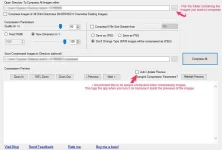
MY COMPRESSION TEST VIA BATCH COMPRESSION USING THE FOLLOWING PARAMETER SETTINGS.
Just play with the "Compression Parameters" til you get your desired quality and file size result, I recommend to set the "Dimension" settings to 100% as to not change the image's resolution.
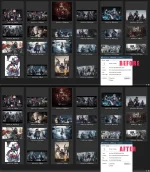
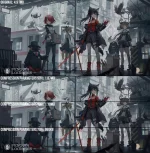
MY COMPRESSION RESULTS
(it only took the program 22 seconds to batch compress these images)
(compression speed might still depend on PC specs)
credits to the original artist: You do not have permission to view the full content of this post. Log in or register now.
credits to the original artist: You do not have permission to view the full content of this post. Log in or register now.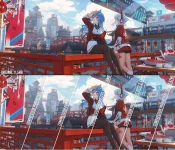
DOWNLOAD LINK - File size: 1.5mb (compressed) / 2.8mb (extracted)
You do not have permission to view the full content of this post. Log in or register now.
You do not have permission to view the full content of this post. Log in or register now.
DIRECT DOWNLOAD LINKS - File size: 1.5mb (compressed) / 2.8mb (extracted)
You do not have permission to view the full content of this post. Log in or register now.
You do not have permission to view the full content of this post. Log in or register now.
You do not have permission to view the full content of this post. Log in or register now.