 PH
PHT A Y L O R _ 1 3
Forum Master
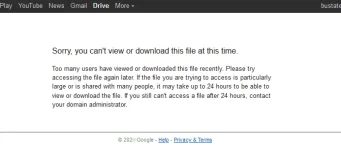
Here are the Best Methods to Fix "Too many users have viewed or downloaded this file recently" issue for Google Drive File.
Step 1. Open the URL of the Google Drive that you wish to download on your Browser.
Step 2. Now when you click on the download button, it will show the error message “Sorry, You can’t View or Download the file“.
Step 3. Replace the download page URL; “uc?id” parameter with “open?id”.

Step 4. Now, once you have changed the “open?id” in the URL, refresh the page to open the preview.
Step 5. Here click on Add shortcut to Drive icon. (Make sure you have signed in to your GDrive account)
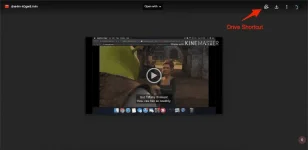
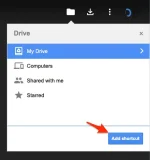
Step 6. Here select the location where you wish to save the file as a shortcut.
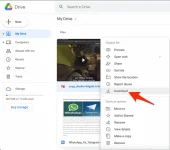
Step 7. Open your Google Drive account and navigate to the file that you have just added as a shortcut. Right-click on the file and hit the "Make a copy" option.
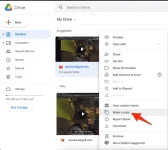
Step 8. Once the copy is created, you can Download the copied file without any issues.
THAT'S IT!!!
And if you're using an android device, or if naka-browser kayo, you just need to click "Desktop Site" sa Chrome, Opera or kung ano mang browser gamit niyo, then just follow the same procedure.


