 PH
PHPHC- Mr Bean
Elite
Good day mga ka PHC!
Ako'y muling nagbabalik para mag bigay ng tutorial
Katanungan #1 : Paano mag " one name " sa facebook? Follow mo lang ang steps
Katanungan #2 : Pwede ba to gawin sa pc? Oo, pwedeng pwede
Requirements :
- Tunnelbear App (pwede sa Android/PC) di pa tested sa ios
Link : You do not have permission to view the full content of this post. Log in or register now. (PC Link)
Steps :

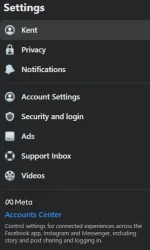
- Click " Accounts Center "
PS : If naka connect na facebook mo sa " instagram " kindly proceed sa steps
Name
Username
Profile Picture
(click mo yung sa baba na may instagram)
Para naman sa di pa naka link ang instagram sa facebook, eto steps :

Congrats! Na one name mo na
Comment lang sa may mga katanungan. If di ma clarify.
Wag kalimutan mag credits. Salamat!
Follow for more tutorials & updates!
Ako'y muling nagbabalik para mag bigay ng tutorial
Katanungan #1 : Paano mag " one name " sa facebook? Follow mo lang ang steps
Katanungan #2 : Pwede ba to gawin sa pc? Oo, pwedeng pwede
Requirements :
- Tunnelbear App (pwede sa Android/PC) di pa tested sa ios
Link : You do not have permission to view the full content of this post. Log in or register now. (PC Link)
Steps :
- Open mo Tunnelbear app
- Hanapin mo " Indonesia " at mag connect
- Log in ka sa facebok using browser (kahit anong browser)
- Punta ka sa Settings ni Facebook (Settings & Privacy)
- Click Settings
- Click " Accounts Center "
PS : If naka connect na facebook mo sa " instagram " kindly proceed sa steps
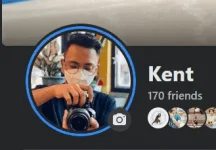
- Click mo yung Profile mo na may " facebook " nakalagay
- Under sa Profile may mga options :
Name
Username
Profile Picture
(click mo yung sa baba na may instagram)
- Turn on " Sync Profile Info "
- Then Allow mo lang kung ano mag prompt (nakalimutan ko ano yun specifically)
- Balik ulit sa Profile " facebook "
- Select " Name "
- Erase mo na yung apilyedo mo
- Lagyan mo ng " 3 space ' yung apilyedo (blank space)
- Save mo na
Para naman sa di pa naka link ang instagram sa facebook, eto steps :
- Click " Accounts Center "
- Add Account " instagram "
- Log in niyo instagram niyo or gawa nalang kayo bago if wala kayo instgram
- Balik na kayo sa steps sa taas
Congrats! Na one name mo na
Comment lang sa may mga katanungan. If di ma clarify.
Wag kalimutan mag credits. Salamat!
Follow for more tutorials & updates!