 PH
PHNeed help ty
Elite
Okay nadin to pang bayad nyu sa Netflix nyu, Spotify or pang renta sa bahay inuupahan nyu. Bali isang buwan nyu nasa ₱1,133.12 lang kikitain nyu.
wala na kayung gagawin basta naka on cp nyu e run nyu lang application okay na at naka on data or wifi nyu at kahit mag lalaro kayu nga ML pwede kikita kayu pag naka running na yung honeygain nyu
May Free $5 ka pag ginamit mo link ko
You do not have permission to view the full content of this post. Log in or register now.
Minimum cash out $20
Paypal app withdrawal
Noted: AT KUNG LAGING KANG ONLINE MAS MABILIS TO MGA 3 WEEKS $20 na
Step 1: Make sure you are eligible for a payout
With Honeygain, you earn credits before converting them into actual dollars. You are ρáíd 1 credit for every 10MB of traffic, and 10 credits equal to $0.01. The minimum payout is $20 (20,000 credits) – once you reach the sum, a 'Request payout' button appears.
If the payout button is unavailable for you just yet, make sure you have the required number of credits in your balance. If not – simply continue using the app and reach the minimum amount! If you have over 20,000 credits and the payout button still doesn't appear, feel free to contact Customer Support.
Step 2: Get an invitation letter
Once you are eligible for the payout, send a request by simply clicking on the payout button. Your email will then be added to our payout list. We'll proceed by entering your information to Tipalti – our selected payment processing platform. Soon, you'll get an invitation email from Tipalti – please make sure you click on the link provided!
Step 3: Register on the payout system
As you open the link, you will be redirected to our payout system's registration page. Simply enter your email address, create a password, and follow the security regulations
Step 4: Receive your money in PayPal
Once you’ve successfully submitted your PayPal payment details to the Tipalti system, you can be sure to receive a payout as fast as possible. Usually, it will take no more than 2 business days to receive your payment. In case of payment failure, you will get a notifying email right away with detailed information on all further steps.
Step 5: Claim your money in PayPal
If you have little to no experience with PayPal, you might get a bit confused with this part. How do you claim the money from PayPal? It's simple: wait for the system's email that informs you of a payment received and click Claim. If this seems to fail, make sure your email address is verified on PayPal, and you account has U.S. dollars added as a currency.
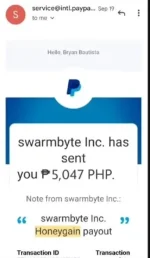

wala na kayung gagawin basta naka on cp nyu e run nyu lang application okay na at naka on data or wifi nyu at kahit mag lalaro kayu nga ML pwede kikita kayu pag naka running na yung honeygain nyu
May Free $5 ka pag ginamit mo link ko
You do not have permission to view the full content of this post. Log in or register now.
Minimum cash out $20
Paypal app withdrawal
Noted: AT KUNG LAGING KANG ONLINE MAS MABILIS TO MGA 3 WEEKS $20 na
Step 1: Make sure you are eligible for a payout
With Honeygain, you earn credits before converting them into actual dollars. You are ρáíd 1 credit for every 10MB of traffic, and 10 credits equal to $0.01. The minimum payout is $20 (20,000 credits) – once you reach the sum, a 'Request payout' button appears.
If the payout button is unavailable for you just yet, make sure you have the required number of credits in your balance. If not – simply continue using the app and reach the minimum amount! If you have over 20,000 credits and the payout button still doesn't appear, feel free to contact Customer Support.
Step 2: Get an invitation letter
Once you are eligible for the payout, send a request by simply clicking on the payout button. Your email will then be added to our payout list. We'll proceed by entering your information to Tipalti – our selected payment processing platform. Soon, you'll get an invitation email from Tipalti – please make sure you click on the link provided!
Step 3: Register on the payout system
As you open the link, you will be redirected to our payout system's registration page. Simply enter your email address, create a password, and follow the security regulations
Step 4: Receive your money in PayPal
Once you’ve successfully submitted your PayPal payment details to the Tipalti system, you can be sure to receive a payout as fast as possible. Usually, it will take no more than 2 business days to receive your payment. In case of payment failure, you will get a notifying email right away with detailed information on all further steps.
Step 5: Claim your money in PayPal
If you have little to no experience with PayPal, you might get a bit confused with this part. How do you claim the money from PayPal? It's simple: wait for the system's email that informs you of a payment received and click Claim. If this seems to fail, make sure your email address is verified on PayPal, and you account has U.S. dollars added as a currency.
