 PH
PH-
Welcome to PHCorner Forums! Sign up for free to unlock full access and exclusive privileges, including:
- Asking questions about computer and mobile issues
- Discovering internet tips for your mobile network and computer
You are using an out of date browser. It may not display this or other websites correctly.
You should upgrade or use an alternative browser.
You should upgrade or use an alternative browser.
🔗 Direct Link Resident Evil 4 Ultimate HD Edition Fitgirl Repack 3.6gb MF Link
- Thread starter hydrargyrum_6
- Start date
unknownAgEnT
Fanatic
hydrargyrum_6
Forum Veteran
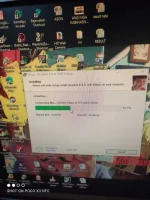
ano po specs mo boss? posible aabot sa 2hrs mahigit po installation lalo na pag mababa ang specs. hayaan lang po pag sobra 3hrs na saka magpanic.hehe
hydrargyrum_6
Forum Veteran
welcome po
hydrargyrum_6
Forum Veteran
alin po ang ayaw mag open?
hydrargyrum_6
Forum Veteran
haha. try ko maglaro sa part na yan at feedback ako kung ano. penge na lang ng save file mo para matry ko s akin.
hydrargyrum_6
Forum Veteran
checke the reviews on this may bug pala talaga pag keyboard ang gamit. kaya pala do ko napansin to kasi controller gamit ko. Eto daw solution for keyboard users.
i) In the Main Menu of the game, go to Video Settings and change the FPS setting to "Fixed 30 FPS".
Unfortunately, if you have already reached the minecart sequence you will find that this means your progress since your most recent save must be lost. This is unavoidable; you will have to repeat the gameplay from the time of the last save and reach the minecart once again;
ii) Reach the end of the minecart sequence once again;
Now, when the minecart is making its final approach towards the QTE (i.e. accelerating as it plunges downward):
iii) Hit Escape to pause and open up the game-options menus;
iv) Put Video Settings (e.g. shadow quality, anti-aliasing, etc.) to their lowest setting (except your screen-resolution);
v) Rebind your keyboard key for "Action" (i.e. the one the game always believes is "X" during the moment QTEs display in RE4, regardless of what key you actually use for "Action") to a key your available desk-space makes practical for you to hammer ferociously with a finger of your dominant hand (i.e. left- or right-handed);
And rebind the key for "Run" (i.e. the one the game always believes is "C" during the moment QTEs display in RE4) to one of the keys adjacent to your new "Action" key to make it simple to hit both at once for the first QTE display (the leap);
vi) Put your dominant hand on the new Action and Run keys and your other hand on the mouse (i.e. swap your usual mouse and keyboard hands around);
vii) Resume play. Be ready as normal for the first QTE display (to make Leon leap across the chasm); it will either read "X & C" or icons for "LMB & RMB" on the screen, representing whatever keys you just rebound for Action and Run;
viii) After hitting the keys for the leap:
Immediately, without waiting for the second QTE-display to actually appear (don't even look at your PC monitor - it will only distract you):
a) Hammer the Action key using your dominant hand with all the passion of your disappointed soul;
AND b) Slowly move the mouse upward with your other hand.
vi) Keep at it for a 6-7 full seconds;
vii) Now bring your world-weary eyes upward to rest on the screen and release a deep exhalation of empty relief as you see that Leon is actually standing safely atop the ledge.
viii) Enjoy the remainder of the game.
- The Solution:
i) In the Main Menu of the game, go to Video Settings and change the FPS setting to "Fixed 30 FPS".
Unfortunately, if you have already reached the minecart sequence you will find that this means your progress since your most recent save must be lost. This is unavoidable; you will have to repeat the gameplay from the time of the last save and reach the minecart once again;
ii) Reach the end of the minecart sequence once again;
Now, when the minecart is making its final approach towards the QTE (i.e. accelerating as it plunges downward):
iii) Hit Escape to pause and open up the game-options menus;
iv) Put Video Settings (e.g. shadow quality, anti-aliasing, etc.) to their lowest setting (except your screen-resolution);
v) Rebind your keyboard key for "Action" (i.e. the one the game always believes is "X" during the moment QTEs display in RE4, regardless of what key you actually use for "Action") to a key your available desk-space makes practical for you to hammer ferociously with a finger of your dominant hand (i.e. left- or right-handed);
And rebind the key for "Run" (i.e. the one the game always believes is "C" during the moment QTEs display in RE4) to one of the keys adjacent to your new "Action" key to make it simple to hit both at once for the first QTE display (the leap);
vi) Put your dominant hand on the new Action and Run keys and your other hand on the mouse (i.e. swap your usual mouse and keyboard hands around);
vii) Resume play. Be ready as normal for the first QTE display (to make Leon leap across the chasm); it will either read "X & C" or icons for "LMB & RMB" on the screen, representing whatever keys you just rebound for Action and Run;
viii) After hitting the keys for the leap:
Immediately, without waiting for the second QTE-display to actually appear (don't even look at your PC monitor - it will only distract you):
a) Hammer the Action key using your dominant hand with all the passion of your disappointed soul;
AND b) Slowly move the mouse upward with your other hand.
vi) Keep at it for a 6-7 full seconds;
vii) Now bring your world-weary eyes upward to rest on the screen and release a deep exhalation of empty relief as you see that Leon is actually standing safely atop the ledge.
viii) Enjoy the remainder of the game.
Controller din gamit ko.. Kasi Hindi talaga ma-press 5... Pat nag switch ako sa keyboard iba iba Ang need I press Lalo pahirap Hindi ko Alin Alin lalabas tapos iba na Naman...
Paano ba mag-extract ng save file at Kung nalampasan mo penge na din ako save file mo na lampas sa minecart para ma-continue ko Ang laro
Paano ba mag-extract ng save file at Kung nalampasan mo penge na din ako save file mo na lampas sa minecart para ma-continue ko Ang laro
hydrargyrum_6
Forum Veteran
copy mo ang file sa loob ng folder Resident Evil 4 - Ultimate HD Edition\Bin32\Profile\Player\Saves ang meron ako chapter 5 na eh. attach mo n lg dito.
eto na yung file
You do not have permission to view the full content of this post. Log in or register now.
You do not have permission to view the full content of this post. Log in or register now.
hydrargyrum_6 pahingi ako nung file mo na lampas sa minecart ng matuloy ko sakin
hydrargyrum_6
Forum Veteran
try ko palampasan sayo. chapter 3 pa lang yang minecart yung meron ako na save is chapter 5 na madami ka na mamimiss sa gameplay pag yun pinatuloy mo.hehe bukas na work mode ako ngayon.hehe
hydrargyrum_6
Forum Veteran
You do not have permission to view the full content of this post.
Log in or register now. minecart sinave ko sa 2nd slot kelangan after tumalon pindot mo na agad ang climb wag na antayin magprompt yung (X) hehe nasa "after" ang link
[XX='hydrargyrum_6, c: 1207663, m: 1839527'][/XX] sir salamat po pero sad.. my bug talaga sa part nayun salazar.. nahuhulog naman sa tulay kasama statue... need swicth sa keyboard at controller.. ang gulo pwede ba mag-request ng save file mo lampas na dun i mean next chapter na lampas dapat sa chapter na yun sabi ni google
thanks po
thanks po
hydrargyrum_6
Forum Veteran
[XX='heaven_69, c: 1210125, m: 960249'][/XX] ano controller gamit mo? yung sa akin kasi xbox one, kelangan lang talaga imash up yung button para umakyat sya.haha nilaro ko nga yan kahapon at meron nga isa pang QTE na ganun sa may statue.haha upload ko yung lampas na kay salazar.
Similar threads
-
🧲 Torrent Resident Evil 4 (2023): Gold Edition v1.5.0.0 (Denuvoless) + 26 DLCs + 3 Bonus OSTs [FitGirl Repack]
- Started by kaito78
- Replies: 0
About this Thread
-
101Replies
-
5KViews
-
46Participants
Last reply from:
kEWPIE
kEWPIE
New Topics
-
[MEDIAFEIRE] : Deluxe Edition (Build 6499) [FitGirl Repack]
- Started by Carlos2026
- Replies: 0
- 🖥️ PC Gaming
-
Stationeers Free Download (Build 24703804 + Co-op)
- Started by 707
- Replies: 0
- 🖥️ PC Gaming
-
CRYO Free Download (Build 25210441 + Co-op)
- Started by 707
- Replies: 0
- 🖥️ PC Gaming
-
Gears of War: E-Day Free Download
- Started by 707
- Replies: 0
- 🖥️ PC Gaming
-
Gears of War E-Day Premium Edition - GameDrive
- Started by w4rez-db
- Replies: 1
- 🖥️ PC Gaming
-
Gears of War: E-Day (v4894958/Release) [FitGirl Repack] MULTi
- Started by Carlos2026
- Replies: 0
- 🖥️ PC Gaming
-
[MEDIAFEIRE] Exanima .v0.9.5.2e for PC (Latest 2026)
- Started by Carlos2026
- Replies: 2
- 🖥️ PC Gaming
-
Halloween Trouble 8-RAZOR | 166 MB
- Started by DLBB
- Replies: 0
- 🖥️ PC Gaming
-
[MEDIAFEIRE] Morbid Metal Game for PC .v2026.10.05(Latest 2026)
- Started by Carlos2026
- Replies: 0
- 🖥️ PC Gaming
-
Palworld Free for PC .v1.0.5.(Latest 2026 version)
- Started by Carlos2026
- Replies: 1
- 🖥️ PC Gaming
Trending Topics
Online now
- Members online
- 1,161
- Guests online
- 3,890
- Total visitors
- 5,051