 PH
PH-
Welcome to PHCorner Forums! Sign up for free to unlock full access and exclusive privileges, including:
- Asking questions about computer and mobile issues
- Discovering internet tips for your mobile network and computer
You are using an out of date browser. It may not display this or other websites correctly.
You should upgrade or use an alternative browser.
You should upgrade or use an alternative browser.
❓ Help Xampp in a Ubuntu/Kali termux "SOLVED"
- Status
- Not open for further replies.
RikkuRikku
Eternal Poster
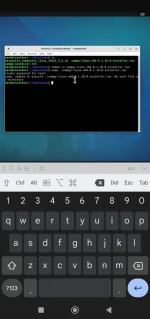
do ls check if the files is in the current directory... or parang mali ung command mo na dapat
sudo ./Downloads/xampp-linux......run
kasi kung sudo ./xampp-linux.....run sa root mo hinahanap nasa download folder ata ung file
sudo ./Downloads/xampp-linux......run
kasi kung sudo ./xampp-linux.....run sa root mo hinahanap nasa download folder ata ung file
do ls check if the files is in the current directory... or parang mali ung command mo na dapat
sudo ./Downloads/xampp-linux......run
kasi kung sudo ./xampp-linux.....run sa root mo hinahanap nasa download folder ata ung file
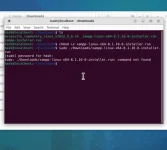
ayaw po e
RikkuRikku
Eternal Poster
mali din ung isa mong command na chmod .... ulitin mo sa simula with the right directory na chmod +x ./Downloads/<file-to-give-execute-permission>.runView attachment 2316817
ayaw po e
mali din ung isa mong command na chmod .... ulitin mo sa simula with the right directory na chmod +x ./Downloads/<file-to-give-execute-permission>.run
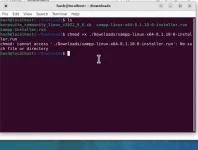
ayaw nya talaga hahahah
much better kung i manually install mo nalang apache, mysql and php kapag linux.
apt install lang yantry mo ngaView attachment 2316834
ayaw nya talaga hahahah
ls tas patingin ng outputmuch better kung i manually install mo nalang apache, mysql and php kapag linux.
try mo ngalstas patingin ng output
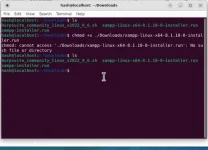
try mo
chmod +x xampp*.run then ./xampp*.runtry mochmod +x xampp*.runthen./xampp*.run
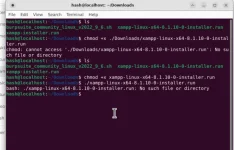
i-rename mo yung file gawin mong maikli lang like
xampp.run then run mo ulit ./xampp.runi-rename mo yung file gawin mong maikli lang likexampp.runthen run mo ulit./xampp.run
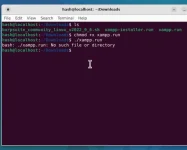
need ata nan ng privilege, try mo
sudo ./xampp.runneed ata nan ng privilege, try mosudo ./xampp.run
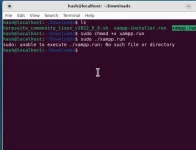
hash@localhost:~$ ls -hPatingin ngls -hatecho $PWD
Desktop Downloads Pictures Templates
Documents Music Public Videos
hash@localhost:~$ echo $PWD
/home/hash
hash@localhost:~$ ls -h
Desktop Downloads Pictures Templates
Documents Music Public Videos
hash@localhost:~$ echo $PWD
/home/hash
sudo /home/hash/Downloads/xampp.run walang . Sa unahan.Kapag ayaw pa din, pasok ka as root
sudo su then /home/hash/Downloads/xampp.runsudo /home/hash/Downloads/xampp.runwalang . Sa unahan.
Kapag ayaw pa din, pasok ka as rootsudo suthen/home/hash/Downloads/xampp.run
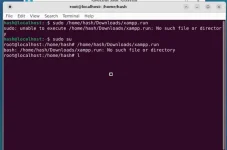
ano size ng installer mo? Run mo 'to
ls -lh /home/hash/Downloads/ano size ng installer mo? Run mo 'tols -lh /home/hash/Downloads/
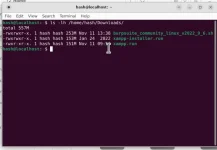
Move mo muna sa ibang folder yang dalawang files, itira mo lang yung xampp.run dyan sa Downloads folder then
sudo /home/hash/Downloads/* yan mismo i run mo, naka * lang wag mo baguhin basta yung xampp.run lang yung nasa loob ng Downloads folder.- Status
- Not open for further replies.
About this Thread
-
26Replies
-
3KViews
-
4Participants
Last reply from:
H A S H
H A S H
New Topics
-
Cracking PLDTHOMFIBR with Google Colab
- Started by cheapboy
- Replies: 0
- 🐧 Linux Distributions
-
25 Linux tips you should know
- Started by KumaKuma
- Replies: 0
- 🐧 Linux Distributions
-
Linux Command Line: Tips & Tricks for Power Users
- Started by Paul25
- Replies: 1
- 🐧 Linux Distributions
-
Linux Distro Reco
- Started by v2clone
- Replies: 6
- 🐧 Linux Distributions
Trending Topics
Online now
- Members online
- 1,051
- Guests online
- 5,436
- Total visitors
- 6,487