No Touchpad in Device Manager

bonesdgreat

Enthusiast
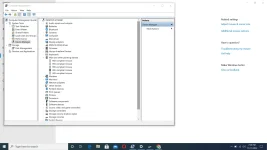
Good eve mga lods. Ask lang po ako kung meron dito alam pano mabalik ang touch pad sa device manager nang magamit ko ulit touchpad? Baka may tutorial kayo jan. Ang laptop is Aspire 3 A3115-55G-79RS. Parefer po sa screenshot sa device manager. For the meantime gumagamit ako ng mouse, yong HID-compliant mouse. Salamat po mga paps.
1.webp
 
Nasa human interface devices yung touchpad.

Subukan mo Fn + F7 baka na turn off mo lang yung device.

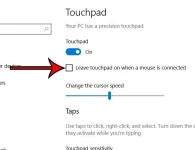
Check mo din touchpad settings

windows-10-disable-touchpad-with-mouse-3.webp


O kaya punta ka acer.com, solutions, detect mo yung serial ng laptop then search and install needed driver, subukan mo elantech o kaya synaptics

windows-10-disable-touchpad-with-mouse-3.webp
 
Download touchpad driver from official website of motherboard brand, search using the serial number indicated on the laptop to find the approptiate/correct driver
 
Try nyo rin po windows update sa settings, select optional updates > driver updates then check nyo po lahat then download install. Reboot after
 

Similar threads

About this Thread

  • 9
    Replies
  • 616
    Views
  • 7
    Participants
Last reply from:
PHC_LaCe12

Trending Topics

Online now

Members online
984
Guests online
1,417
Total visitors
2,401

Forum statistics

Threads
2,276,208
Posts
28,968,320
Members
1,231,166
Latest member
williamfreede
Back
Top