 PH
PHPHC- Naksu
Elite
Companies always struggle when selecting an application suite for their business that can offer them options such as word processing, spreadsheet, database management, e-mail and storage at one place. And most of them have Microsoft’s Office suite in their purchase plan. But they always get confused between choosing Microsoft Office 2019 and You do not have permission to view the full content of this post. Log in or register now. plans and features offerings.
To help you out, here is a comparison on Microsoft Office 2019 vs Office 365:
1.
What is Microsoft Office 2019?
Microsoft Office 2019 is the latest version of Microsoft’s standalone Office productivity suite which include offline Office applications.
What is Office 365?
Office 365 is the Microsoft’s subscription service that offers Office productivity suite which include offline as well as online Office applications.
2.
Applications that comes with Microsoft Office 2019 plan:
Microsoft Office 2019 offers Office apps like Excel, Word, and PowerPoint where it doesn’t offer any future app updates excluding security updates.
Applications that comes with Office 365 plan:
Office 365 offers always latest version of Office apps like Excel, Word, PowerPoint, and Outlook. You’ll always get the latest features, new tools, security updates, and bug fixes. Users also get other web-based applications such as SharePoint, Microsoft Teams, Yammer and many more.
3.
No. of devices you can install or use Microsoft Office 2019 on?
Microsoft Office 2019 can be installed once on either a PC or Mac for a single purchase.
No. of devices you can install or use Office 365 on?
Office 365 can be installed on all your devices and sign in to five at the same time―that means you can use Office no matter where you are or what device you’re on. This includes PCs, Macs, tablets, and phones. You can also share your subscription with up to five other people.
4.
Does Microsoft Office 2019 offer online storage?
No, online storage is not included in Microsoft Office 2019 plans.
Does Office 365 offer online storage?
Office 365 plans offers you to securely store your files in the cloud and access them from anywhere. You get multiple OneDrive cloud storage per user options ranging from 1 TB to Unlimited.
5.
What are the purchase options for Microsoft Office 2019 Plan?
You can purchase Microsoft Office 2019 license by paying a single, one-time cost.
What are the purchase options for Office 365 Plan?
You can purchase Office 365 plan by paying a small monthly fee, or save by paying for a full year.
6.
Technical support in Microsoft Office 2019 plans?
Initial technical support is included for installing only.
Technical support in Office 365 plans?
No extra cost for help with technical issues, or for subscription and billing support.
7.
Types of available plan in Microsoft Office 2019?
– Office Home & Student 2019,
– Office Home & Business 2019,
– Office Professional 2019
Types of available plan in Office 365?
– O365 Home
– O365 Personal
– Office 365 Business Plans
– Office 365 Enterprise Plans
Pros and Cons of Microsoft Office 2019 and Office 365
Pros: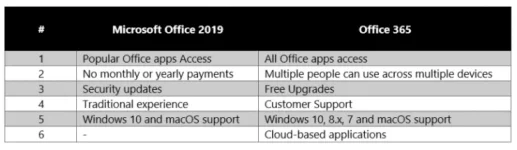
Cons:
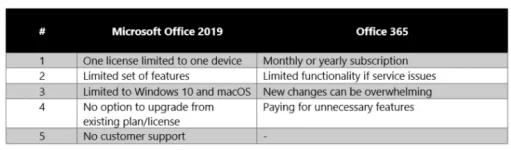
Office 2019 is sold as a one-time purchase, which means you pay a single, up-front cost to get office apps for one pc. One-time purchases are available for both PCs and Macs. However, there aren’t any upgrade options which means if you plan to upgrade to the next major release, you’ll have to buy it at full price. Whereas, office 365 is available online as well as offline. All you need is to register for a Microsoft Account with a new or existing email address.
If you select to buy You do not have permission to view the full content of this post. Log in or register now., you should purchase the yearly subscription as you will be spending extra money paying the monthly fee.
Perhaps one of the most effective parts about getting a subscription plan is that you never have to worry about new versions. when you’re using office 365, you will always be running the foremost up-to-date version of the apps that Microsoft can offer.
Office 365
You do not have permission to view the full content of this post. Log in or register now.
You do not have permission to view the full content of this post. Log in or register now.
You do not have permission to view the full content of this post. Log in or register now.
Office 2019
You do not have permission to view the full content of this post. Log in or register now.
You do not have permission to view the full content of this post. Log in or register now.
You do not have permission to view the full content of this post. Log in or register now.
You may also check this Link for Office 2021
