 PH
PHShare ko lang si opendns medyo may kalakasan dn ng kunti for smartbro pocketwifi users using unlisurf.
Opendns: 208.67.222.222
208. 67.222.220
Prof: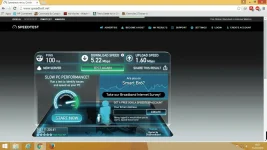
hindi ko nakunan ng screenshot before ko gumamit ng opendns peru ang speedtest ko using default dns is 1.29mbps lang ang dl tapos 1 point something lang din ang upload..fast dn ang loading ng pages pag opendns ang gamit.
To change dns:
1. Just go to "control panel" then select "network and internet."
2. Click "Viewnetwork status and task."
3. click "Local Area Connection" or the "pocketwifi connection"
4. Select properties, "network sharing tab", scroll down and select "internet protocol version 4 (TCP/IPv4)."
5. click "properties" and on general tab "tick" the, "use the following DNS server address.
6. Put the opendns server as mention above.
7. then check "validate settings upon exit."
8. after that disable your network for 30 seconds.
9. enable it again and your done.
note: Just try to do a speedtest before anything else to compare your internet speed.
credits to: You do not have permission to view the full content of this post. Log in or register now.
Sorry if kung may kulang sa post ko newbie lang po mga boss...just trying to help.
Pag hindi gagana sa inyo try niyo gumamit ng DNS JUMPER.
Opendns: 208.67.222.222
208. 67.222.220
Prof:
hindi ko nakunan ng screenshot before ko gumamit ng opendns peru ang speedtest ko using default dns is 1.29mbps lang ang dl tapos 1 point something lang din ang upload..fast dn ang loading ng pages pag opendns ang gamit.
To change dns:
1. Just go to "control panel" then select "network and internet."
2. Click "Viewnetwork status and task."
3. click "Local Area Connection" or the "pocketwifi connection"
4. Select properties, "network sharing tab", scroll down and select "internet protocol version 4 (TCP/IPv4)."
5. click "properties" and on general tab "tick" the, "use the following DNS server address.
6. Put the opendns server as mention above.
7. then check "validate settings upon exit."
8. after that disable your network for 30 seconds.
9. enable it again and your done.
note: Just try to do a speedtest before anything else to compare your internet speed.
credits to: You do not have permission to view the full content of this post. Log in or register now.
Sorry if kung may kulang sa post ko newbie lang po mga boss...just trying to help.
Pag hindi gagana sa inyo try niyo gumamit ng DNS JUMPER.

