 PH
PHMga ka-PHC! 
Share ko lang itong project na dine-develop ko, WeMake POS. Para ito sa mga may small business na gusto mas organized ang benta, stocks, customer records, at daily reports.
Hindi lang siya pang-cashier. May tools din para sa services, branches, staff, returns, at mga customer na may outstanding balance.
Browser-based siya, kaya walang installer. Puwedeng buksan sa PC, tablet, at mobile gamit ang internet connection.
Para mas madaling makita kung bagay sa business ninyo, ito ang mga features:
Para hindi mo na kailangang isa-isahin ang orders para makita ang takbo ng business:
Hindi lang physical items ang puwedeng ibenta:
Para sa transactions na hindi pa fully ρáíd:
Time-limited ang free demo, hindi lifetime free. Nasa welcome email ang access period. No credit card needed. Message lang bago matapos ang demo kung gusto ninyong pag-usapan ang continued access.
Kung may bug, confusing na screen, o feature na kailangan ninyo, comment lang. Helpful kung may screenshot, device/browser, at steps kung paano nangyari—pero paki-blur ang passwords at private customer details.
Hindi ko maipapangakong lahat ng suggestions ay maidagdag agad, pero malaking tulong ang feedback mula sa actual users.
Website: You do not have permission to view the full content of this post. Log in or register now.
Email: business@poswemake.com
Salamat sa mga susubok!
— WeMake

Share ko lang itong project na dine-develop ko, WeMake POS. Para ito sa mga may small business na gusto mas organized ang benta, stocks, customer records, at daily reports.
Hindi lang siya pang-cashier. May tools din para sa services, branches, staff, returns, at mga customer na may outstanding balance.
Browser-based siya, kaya walang installer. Puwedeng buksan sa PC, tablet, at mobile gamit ang internet connection.
Para mas madaling makita kung bagay sa business ninyo, ito ang mga features:
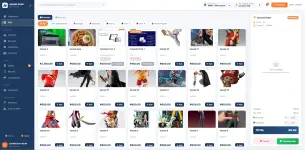
 POS at checkout
- Product search at category filtering
- Products at services sa isang order
- Quantity adjustment at pagtanggal ng items sa cart
- Guest checkout o pagpili ng existing customer
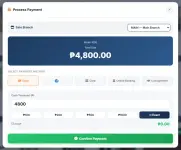
- Discount, tax, at shipping fee
- Cash payment recording, cash tendered, at sukli calculation
- Payment recording para sa GCash, card, at bank transfer
- Reference details para madaling balikan ang payment
- Consignment o pay-later transactions
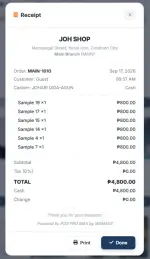
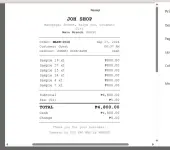
- Receipt preview, printing, at reprinting
 Dashboard at reports
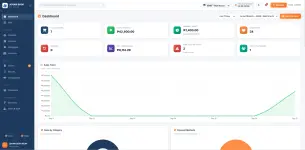
Para hindi mo na kailangang isa-isahin ang orders para makita ang takbo ng business:- Total orders, revenue, profit, at items sold
- Returns, average order value, at customer count
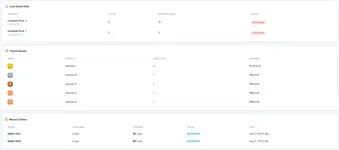
- Low-stock at out-of-stock summary
- Sales trend at sales-by-hour charts
- Sales breakdown by category
- Payment-method breakdown
- Top products at recent orders
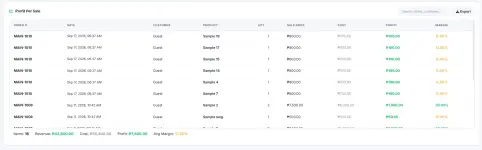
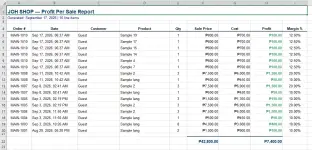
- Profit-per-sale details
- Date-period at branch filters
- Excel report exports
 Product management
- Add at edit products
- Product image upload o image URL
- Category, tag, cost, stock, at reorder point
- Retail, reseller, distributor, at master-distributor prices
- Customer-type-based pricing kapag naka-configure ang corresponding price
- Search, filters, at sorting
- Bulk product import mula sa supported spreadsheet files
- Downloadable import template
 Service management
Hindi lang physical items ang puwedeng ibenta:- Service code, name, category, at description
- Default price, minimum price, at service cost
- Service availability per branch
- Agreed service price sa checkout
- Assigned-staff field at service notes
- Service revenue, quantity sold, at profit summary
 Categories
- Add at edit categories
- Bulk-add ng categories
- Custom category icon at color
- Display-order setting
- Category status at product count
- Search at filtering
 Inventory at stock history
- Current stock per product
- Low-stock at out-of-stock alerts
- Configurable reorder points
- Stock-value summary
- Stock adjustments na may quantity at reason
- Stock movement history at audit report
- Inventory at stock-audit exports
- Stock updates kaugnay ng recorded sales at applicable return actions
 Order history
- Search ng previous transactions
- Filters by date at payment method
- Order details at item breakdown
- Customer, staff, payment, at transaction date
- Subtotal, tax, discount, shipping, at total
- Receipt reprinting
- Order export
 Consignment at collections
Para sa transactions na hindi pa fully ρáíd:- Unpaid, partially ρáíd, overdue, at ρáíd views
- Outstanding-balance summary
- Payment recording at payment history
- First due date at installment schedule
- Configurable installment count at payment interval
- Customer contact details at transaction notes
- Customer credit-limit settings
- Collection summary at report export
 Returns at defects
- Record ng return na naka-link sa customer at order
- Item, quantity, reason, at notes
- Replacement, refund, o write-off resolution
- Returned-item handling: restock, quarantine, o write-off
- Pending at resolved status tracking
- Returned-unit at refund summaries
- Search, filters, at export
 Customer records
- Customer name, email, phone, at address
- Retail, reseller, distributor, at master-distributor customer types
- Purchase history
- Total orders at total spent
- Consignment balance, credit limit, at notes
- Search at customer filtering
 Multi-branch management
- Add at edit branches
- Branch code, name, address, at contact details
- Receipt prefix per branch
- Branch switching para sa authorized users
- Branch sales, transactions, quantity sold, at profit summaries
- Service-performance at stock summaries
- Branch status management
 Users at staff
- Separate staff accounts
- Staff assignment sa isang branch
- Active/inactive account controls
- Temporary login credentials at password-reset tools
- Required password change for accounts issued temporary passwords
- Branch-limited staff access
- Administrator access across branches
 Settings at personalization
- Custom system name at tagline
- Shop name, address, at phone number
- Shop logo
- Tax rate at currency symbol
- Receipt footer
- Sound-effects preference
- Auto-print receipt option
- Dark mode
 Guide at About
- Built-in setup guide
- Feature walkthrough at sale-workflow guide
- About page na may system version at developer information
- Optional GCash donation section para sa gustong sumuporta
Paano subukan?
Punta lang sa You do not have permission to view the full content of this post. Log in or register now., then:- Click Request a Free Demo.
- Fill out your business details.
- Verify your email gamit ang code.
- Submit the form.
- Check your inbox para sa workspace link at sign-in details.
Time-limited ang free demo, hindi lifetime free. Nasa welcome email ang access period. No credit card needed. Message lang bago matapos ang demo kung gusto ninyong pag-usapan ang continued access.
Konting heads-up
Cloud-based ang system, kaya kailangan ng internet. Patuloy ko rin itong ini-improve, lalo na sa iba’t ibang screen sizes at devices. Mas okay na subukan muna gamit ang sample transactions bago gamitin sa actual operations.Kung may bug, confusing na screen, o feature na kailangan ninyo, comment lang. Helpful kung may screenshot, device/browser, at steps kung paano nangyari—pero paki-blur ang passwords at private customer details.
Hindi ko maipapangakong lahat ng suggestions ay maidagdag agad, pero malaking tulong ang feedback mula sa actual users.
Website: You do not have permission to view the full content of this post. Log in or register now.
Email: business@poswemake.com
Salamat sa mga susubok!
— WeMake