You could try this if u can't find a way backing your mobile phone up using spflashtool
Install Nandroid Backup
Nandroid is an application capable of making complete snapshots of your whole phone as well as restoring from those snapshots.
There are different ways of getting Nandroid onto your phone and here we will use the simplest of all approaches - using the ClockworkMod ROM Manager application which also comes with a whole bunch of other useful stuff. It can only be used on rooted phones, which is why step 1 was necessary.
This is the easiest part. Hrm, come to think of it, everything described here is pretty easy but installing an application from the Android Market - what can be easier?
- Access the Android Market by loading the Market app.
- Search for "ROM Manager".
- Install ClockworkMod ROM Manager.
And now you're done with step 2. Did I mention this was the last step?
Back Up Your Phone
Now we can do the actual backup.
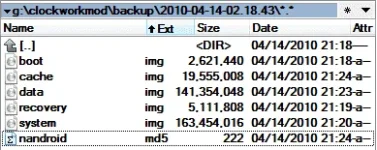
The backup itself will take about 5-10 minutes and will produce a new timestamped directory on the SD card. This directory will contain all of the files needed for restoration - they comprise your full backup.
Here, I'll give you a preview of what a full backup looks like:
 PH
PH