PH
PHBAD_KING_PH OFFICIAL
Forum Master

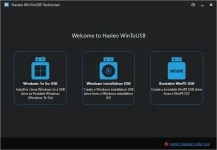
WinToUSB Overview
WinToUSB is the best Windows To Go M@ker that allows you to install andrun Windows 0perating SyStem on a USB hard drive or USB flash drive, using an IS0 image or CD/DVD drive as the source of installation.
Key Features of WinToUSB
- Easy-to-use wizard interface that provides step-by-step instructions for creating a Windows To Go USB drive.
- Creation of Windows To Go from an IS0 image file or CD/DVD drive.
- Cl0ne an existing Windows 0S (Windows 7 or later) to a USB Drive as a Windows To Go W0rkspace.
- Use of a N0n-Enterprise Edition of Windows 10/8.1/8/7 to create Windows To Go W0rkspace.
- Creation of Windows To Go on Non-Certified Windows To Go USB Drive.
- Cl0ne current Windows 0S (Enterprise edition of Windows 10/8.1/8/7) to a USB drive as a Windows To Go W0rkspace
- Cl0ne current Windows 0S which on a dynamic disk to a USB drive as a Windows To Go Workspace
- Cl0ne current Windows 0S which on a USB disk (Windows To Go USB drive) to other USB drives as a Windows To Go W0rkspace
Changelog:
- Add support for WinPE 10-8 Sergei Strelec
- Norwegian language support
- Fixed some bugs to improve product quality
How to use Cr@ck of WinToUSB?
- Install software using given installer (in Setup folder)
- Close program if running (Even from system tray)
- Extract “Cr@ck Keys.zip” file and Open either 32 or 64 Bit folder, select an edition and copy its content to program’s installation folder
- That’s it, Enjoy!

Link:
Spoiler contents are visible only to Established Members.
Attention:
This cr*ck is not forsale!
So enjoy.
Good LuckGod Bless Youu and Keep Safe Always!!!!
Pass+
 = phcbadking08
#share
#software
#PHBadking