PH
PHetogresjack
Fanatic
Mga ka ph tanong ko lang paano po ba mag disable ng usb port na hindi madadamay pati yung mouse and keyboard pag disable ko kasi sa bios nadadamay pati yung mouse and keyboard. Thank you in advance.
para hindi masaksakan ng usb yung computer shop boss. maraming salamatBakit naman kailangan mong i-disable, TS?
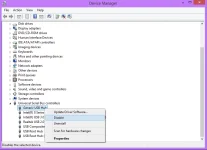
Sa Device Manager > Universal Serial Bus Controllers, check mo isa-isa kung aling USB ang gamit ni mouse at ni keyboard, at iyon ang hindi idi-disable.
View attachment 2203289
boss permanent na to ? pag nadisable ko ?Bakit naman kailangan mong i-disable, TS?
Sa Device Manager > Universal Serial Bus Controllers, check mo isa-isa kung aling USB ang gamit ni mouse at ni keyboard, at iyon ang hindi idi-disable.
View attachment 2203289
Ah, computer shop pala. Parang switch iyan, hindi siya gagana hanggang hindi mo i-enable.para hindi masaksakan ng usb yung computer shop boss. maraming salamat
boss permanent na to ? pag nadisable ko ?
Maraming salamat dito boss.Ah, computer shop pala. Parang switch iyan, hindi siya gagana hanggang hindi mo i-enable.
Pero kung hindi effective iyan (kung alam ng user galawin ang settings), wala rin.
Ito ang kailangan mong gawin:
Kung ang edition ng Windows mo ay pro or enterprise, available agad itong procedure na ito sa gpedit.msc, sundan mo lang:
You do not have permission to view the full content of this post. Log in or register now.
Kung Home edition, additional steps para ma-avail yung gpedit.msc:
You do not have permission to view the full content of this post. Log in or register now.
Walang anuman, TS.Maraming salamat dito boss.