 PH
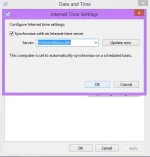
PHgood afternoon po sa lahat tanong ko lang po kung ano pa po ba ang pwedeng solution sa time and date na lageng nagbabago kada power on po? pinalitan ko na kasi yung cmos battery ng laptop ko ok naman nung unang gamit pero nung sumunod na bukas ng laptop ko nagbago na naman ulet yung time lage ko tuloy sya kailangan isync everytime na magbubukas ako ng laptop
-
Welcome to PHCorner Forums! Sign up for free to unlock full access and exclusive privileges, including:
- Asking questions about computer and mobile issues
- Discovering internet tips for your mobile network and computer
🔒 Closed Laptop cmos problem?
- Thread starter heyhey
- Start date
Similar threads
-
❓ Help OOBESETTING problem laptop
- Started by Markmarkmaek11
- Replies: 0
-
-
No ExítLág No Problem Use This For Mobile, PC/Laptop & More
- Started by jayking30
- Replies: 3
-
❓ Help Question about laptop Ram upgrade po.
- Started by VrInG BaCk
- Replies: 15
-
❓ Help LAPTOP RECOMENDATION FOR GAMING/PROGRAMMER
- Started by keenden
- Replies: 10