PH
PHCREATE ACCOUNT
You do not have permission to view the full content of this post. Log in or register now.
You do not have permission to view the full content of this post. Log in or register now.
Steps for You do not have permission to view the full content of this post. Log in or register now.
check the following...
Collaborative coding
Automation and CI/CD
Community
Create Repository> (Any Name)
Check Add Read Me File
NEXT STEP GO TO NGROK GAWA NG ACCOUNT BASIC LANG YAN.
CONFIRM EMAIL
AFTER THAT GO TO THIS LINK
You do not have permission to view the full content of this post. Log in or register now. NG ACCOUNT NYO)/(REPOSITORY NG ACCOUNT NYO)/settings/environments/new
GAWA NG NAME >>>>>>>Scroll down>>>> Add Secret
> NGROK_AUTH_TOKEN
FOR THE SECRET VALUE GO TO THIS LINKYou do not have permission to view the full content of this post. Log in or register now.COPY THEN PASTE NYO UNG TOKEN DUN SA
You do not have permission to view the full content of this post. Log in or register now.
THEN SAVE
PUNTA KAYO SA ACTIONS MENU CLICK NYO CONFIGURE THEN BURAHIN LAHAT NG FILE NA NAKASULAT
FOR THE FILES NA IPAPALIT NYO down bellow
copy then paste lang.
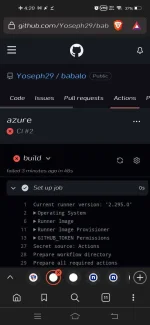
after that go to Actions menu
may makikita na kayo jang CI
dun lalabas ung ginawa nyong USER and Pass ng VPS
then the rest is history.
bahala na kyo umintindi tinatamad na ako ehh.
You do not have permission to view the full content of this post. Log in or register now.
You do not have permission to view the full content of this post. Log in or register now.
Steps for You do not have permission to view the full content of this post. Log in or register now.
check the following...
Collaborative coding
Automation and CI/CD
Community
Create Repository> (Any Name)
Check Add Read Me File
NEXT STEP GO TO NGROK GAWA NG ACCOUNT BASIC LANG YAN.
CONFIRM EMAIL
AFTER THAT GO TO THIS LINK
You do not have permission to view the full content of this post. Log in or register now. NG ACCOUNT NYO)/(REPOSITORY NG ACCOUNT NYO)/settings/environments/new
GAWA NG NAME >>>>>>>Scroll down>>>> Add Secret
> NGROK_AUTH_TOKEN
FOR THE SECRET VALUE GO TO THIS LINKYou do not have permission to view the full content of this post. Log in or register now.COPY THEN PASTE NYO UNG TOKEN DUN SA
You do not have permission to view the full content of this post. Log in or register now.
THEN SAVE
PUNTA KAYO SA ACTIONS MENU CLICK NYO CONFIGURE THEN BURAHIN LAHAT NG FILE NA NAKASULAT
FOR THE FILES NA IPAPALIT NYO down bellow
copy then paste lang.
after that go to Actions menu
may makikita na kayo jang CI
dun lalabas ung ginawa nyong USER and Pass ng VPS
then the rest is history.
bahala na kyo umintindi tinatamad na ako ehh.