🔒 Closed HELP!!! external drive not initialized

Status
Not open for further replies.
baka mahirapan ka macopy ulit yan, mabubura na kasi yan kapag inayos.
kasi need mo initialized yan eh, tapos gawa ka partition.

ewan ko lang kung kaya ng EaseUs or Recuva
 
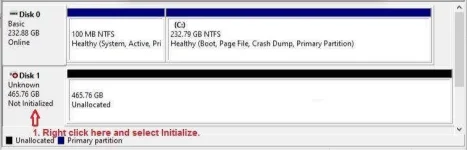
TS, pa-screenshot ng Disk Management. Check natin kung nade-detect pa siya ni Windows. Tulad nitong nasa picture:

disk 1 - Copy.webp
 
"ganyan nga siya, pero di gumana sa external ko"
Ano ang size ng external drive mo? yan ba yung 2.5" na pang laptop o yung 3.5" na gamit sa desktop?
Check mo yung cable niya, wala bang dumi yung USB socket at plug, pati yung saksakan sa external drive? maayos ba yung pagkasaksak nila? Subukan mo sa ibang USB socket ng laptop mo.

Kung ok yung cable, right click mo yung disk 1 at select mo yung Initialize disk, tapos piliin mong Partition style yung MBR kung legacy pa yung bios ng computer mo, GPT kung UEFI na yung bios ng computer mo (Win 7 and later versions).
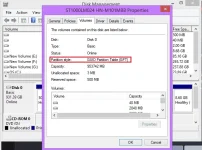
Kung hindi ka sure, right click mo muna yung disk 0, click Properties, sa Volumes tab makikita mo yung Partition style kung MBR o GPT.

Screenshot (806).png
 
Status
Not open for further replies.

About this Thread

  • 5
    Replies
  • 389
    Views
  • 4
    Participants
Last reply from:
Pen_J

Trending Topics

Online now

Members online
843
Guests online
951
Total visitors
1,794

Forum statistics

Threads
2,276,096
Posts
28,967,579
Members
1,231,118
Latest member
czardinas
Back
Top