 PH
PH-
Welcome to PHCorner Forums! Sign up for free to unlock full access and exclusive privileges, including:
- Asking questions about computer and mobile issues
- Discovering internet tips for your mobile network and computer
You are using an out of date browser. It may not display this or other websites correctly.
You should upgrade or use an alternative browser.
You should upgrade or use an alternative browser.
👨🏫 Tutorial Microsoft Product Key CMD update 05 | 21 | 2024
- Thread starter Phc-Joshua
- Start date
1. ACTIVATE WINDOWS
FOR WINDOWS 10/11:
Step 1: Press Windows+R key on keyboard.
Step 2: Type in "powershell", then press OK.
Step 3: Type in "irm You do not have permission to view the full content of this post. Log in or register now. | iex "
Step 4: Press Enter. If mang-hingi ng admin access, just accept.
Step 5: Press 1, then press 1 again.
Step 6: After nyan, pwede mo nang i-close yung CMD and Powershell. Activated na ang Windows mo. paste ko lang dito boss ..para madali ko lang makita..
FOR WINDOWS 10/11:
Step 1: Press Windows+R key on keyboard.
Step 2: Type in "powershell", then press OK.
Step 3: Type in "irm You do not have permission to view the full content of this post. Log in or register now. | iex "
Step 4: Press Enter. If mang-hingi ng admin access, just accept.
Step 5: Press 1, then press 1 again.
Step 6: After nyan, pwede mo nang i-close yung CMD and Powershell. Activated na ang Windows mo. paste ko lang dito boss ..para madali ko lang makita..
Working boss salamat po...1. ACTIVATE WINDOWS
FOR WINDOWS 10/11:
Step 1: Press Windows+R key on keyboard.
Step 2: Type in "powershell", then press OK.
Step 3: Type in "irm You do not have permission to view the full content of this post. Log in or register now. | iex "
Step 4: Press Enter. If mang-hingi ng admin access, just accept.
Step 5: Press 1, then press 1 again.
Step 6: After nyan, pwede mo nang i-close yung CMD and Powershell. Activated na ang Windows mo. paste ko lang dito boss ..para madali ko lang makita..
PHC-BINERO
Forum Veteran
Lakas wow lamat paps
PHC-LordGrim
Elite
thankyou master, keep on sharing
Boss pa update nman po Ng link..thanks
Para sa mga need activate Windows and Office nila sa Microsoft. ( Need Internet )
- Disable mo muna anti virus mo (lahat ng anti virus) e. g Windows Security
- Click the Start Menu, type PowerShell, and open it.
- Copy and paste the code below and press Enter.
see image 1:Code:irm https://get.activated.win | iex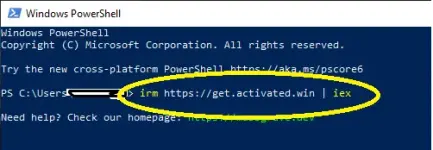
- Eto dapat lalabas
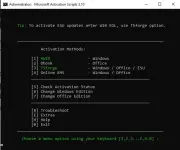 \
\ - Pili ka dyan kung ano i-activate mo.
Eto Guide:
HWID Windows...
- Phc-Joshua
- Replies: 53
- Forum: 🆓 Freemium Access


New thread na paps
Carly_Rose
Eternal Poster
Hindi na gumagana yung dl ts
Nandyan sa comment new threadHindi na gumagana yung dl ts
Similar threads
-
👨🏫 Tutorial Microsoft Product Permanent Key CMD update 02 | 14 | 2026
- Started by Phc-Joshua
- Replies: 53
About this Thread
-
558Replies
-
26KViews
-
401Participants
Last reply from:
PsychoPot
PsychoPot
New Topics
-
ESET ADVANCED SECURITY ( EIS + ENA + EMS ) 19/10/2026
- Started by loveme2025
- Replies: 0
- 🆓 Freemium Access
-
TIDAL INDIVIDUAL w/ DJ EXTENSION | 1 MONTH #67
- Started by Beatriz9
- Replies: 1
- 🆓 Freemium Access
-
Netflix Premium Cookies 450x 10-20-26
- Started by BossHabibi
- Replies: 2
- 🆓 Freemium Access
-
Primevideo Premium Cookies 22x 10-20-26
- Started by BossHabibi
- Replies: 0
- 🆓 Freemium Access
-
HBO MAXX Premium Cookies 34x 10-20-26
- Started by BossHabibi
- Replies: 0
- 🆓 Freemium Access
-
𝙲𝚛𝚞𝚗𝚌𝚑𝚢𝚛𝚘𝚕𝚕 Premium Cookies 85x 10-20-26
- Started by BossHabibi
- Replies: 0
- 🆓 Freemium Access
-
Spotify Family and Mix Plan Premium Cookies 38x 10-20-26
- Started by BossHabibi
- Replies: 2
- 🆓 Freemium Access
-
Netflix Direct Links [PH] | PC | Mobile | TV | #51
- Started by JoyBoy_
- Replies: 1
- 🆓 Freemium Access
-
Prime Video Cookies X10 #35
- Started by JoyBoy_
- Replies: 0
- 🆓 Freemium Access
-
TIDAL INDIVIDUAL w/ DJ EXTENSION | 1 MONTH #66
- Started by Beatriz9
- Replies: 5
- 🆓 Freemium Access
Trending Topics
Online now
- Members online
- 582
- Guests online
- 10,339
- Total visitors
- 10,921