PH
PH Uninstaller Pro Updated to 5.0.5

WHY USE REVO UNINSTALLER PRO?
Complete powerful software uninstall
Quick Uninstall of one or few programs in a row
The best Windows application to uninstall stubborn programs easily
Remove junk files and unnecessary program files
Compatible with all 32-bit and 64-bit versions of Windows
Portable version for all your personal Windows devices
Customizable and flexible easy to use user interface
Free professional technical support
What's new in Revo Uninstaller Pro 5.0.5
General
Added – Uninstall History module to keep track of all completed uninstall operations
Added – Dark mode to the user interface (UI) of Revo Uninstaller Pro
Added – Customization options for most colors in the user interface (UI)
Added – Export/import option for the settings of Revo Uninstaller Pro
Added – Option for automatic silent update in background and update from command line
Added – Revo Uninstaller Pro support for long paths when the OS supports it
Uninstaller
Added – Capability to uninstall programs and Apps installed for standard (non-admin) users
Added – Capability of scanning all Windows accounts for leftovers during an uninstallation of program or App
Added – Multiple (batch) uninstallation of Windows Apps and Browser Extensions
Added – Summary pages to show detailed results from uninstall operations
Added – Command-line support for Windows Apps and Browser Extensions
Added – Show number of selected items in status bar
Added – Option during regular uninstall command all leftovers to be deleted automatically
Added – "Reset", "Reset Windows Store Apps" and "Terminate" commands to the context menu of Windows Apps
Added – Possibility for easier multi-selection of apps and browser extensions using checkboxes
Improved – User interface of Uninstalling wizard
Redesign and Improved user interface and logic of Quick Uninstall
Improved – Scanning and loading of leftovers speed when uninstalling large programs by 30-50%
Improved – Leftover scanning algorithms for programs and Windows apps
Redesigned and improved the algorithms and the user interface of Quick Uninstall feature
Autorun Manager
Improved – AutoRun Manager to list startup Windows Apps
Windows Tools
Added – Added three new tools to the Windows Tools module
1.DISM to repair image of Windows 10 and up
2.Flush DNS cache
3.DirectX info and diagnostic
Added – Added option for users to add their own tools
Instructions
==============
1. Uninstall the Previous Version With IObit Uninstaller
2. Turn Off Your Virus Guard
3. Install Program & Don't Run It (If Running Then Quit)
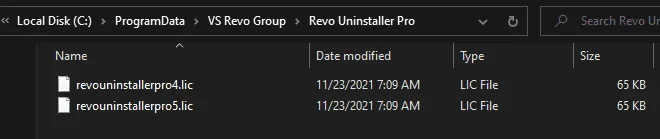
4. Copy license to "C:\ProgramData\VS Revo Group\Revo Uninstaller Pro\"
5. Done! Enjoy
DOWNLOAD
You do not have permission to view the full content of this post. Log in or register now.
You do not have permission to view the full content of this post. Log in or register now.
WHY USE REVO UNINSTALLER PRO?
Complete powerful software uninstall
Quick Uninstall of one or few programs in a row
The best Windows application to uninstall stubborn programs easily
Remove junk files and unnecessary program files
Compatible with all 32-bit and 64-bit versions of Windows
Portable version for all your personal Windows devices
Customizable and flexible easy to use user interface
Free professional technical support
What's new in Revo Uninstaller Pro 5.0.5
General
Added – Uninstall History module to keep track of all completed uninstall operations
Added – Dark mode to the user interface (UI) of Revo Uninstaller Pro
Added – Customization options for most colors in the user interface (UI)
Added – Export/import option for the settings of Revo Uninstaller Pro
Added – Option for automatic silent update in background and update from command line
Added – Revo Uninstaller Pro support for long paths when the OS supports it
Uninstaller
Added – Capability to uninstall programs and Apps installed for standard (non-admin) users
Added – Capability of scanning all Windows accounts for leftovers during an uninstallation of program or App
Added – Multiple (batch) uninstallation of Windows Apps and Browser Extensions
Added – Summary pages to show detailed results from uninstall operations
Added – Command-line support for Windows Apps and Browser Extensions
Added – Show number of selected items in status bar
Added – Option during regular uninstall command all leftovers to be deleted automatically
Added – "Reset", "Reset Windows Store Apps" and "Terminate" commands to the context menu of Windows Apps
Added – Possibility for easier multi-selection of apps and browser extensions using checkboxes
Improved – User interface of Uninstalling wizard
Redesign and Improved user interface and logic of Quick Uninstall
Improved – Scanning and loading of leftovers speed when uninstalling large programs by 30-50%
Improved – Leftover scanning algorithms for programs and Windows apps
Redesigned and improved the algorithms and the user interface of Quick Uninstall feature
Autorun Manager
Improved – AutoRun Manager to list startup Windows Apps
Windows Tools
Added – Added three new tools to the Windows Tools module
1.DISM to repair image of Windows 10 and up
2.Flush DNS cache
3.DirectX info and diagnostic
Added – Added option for users to add their own tools
Instructions
==============
1. Uninstall the Previous Version With IObit Uninstaller
2. Turn Off Your Virus Guard
3. Install Program & Don't Run It (If Running Then Quit)
4. Copy license to "C:\ProgramData\VS Revo Group\Revo Uninstaller Pro\"
5. Done! Enjoy
DOWNLOAD
You do not have permission to view the full content of this post. Log in or register now.
You do not have permission to view the full content of this post. Log in or register now.