 PH
PH
J
Jeanh
Configure GuizmOVPN on iPhone/iPad
This tutorial describes how to configure OpenVPN connection to SecurityKISS servers using GuizmOVPN program.
GuizmOVPN is a third party shareware software and you can use it without restrictions for 7 days.
The installation requires a rooted (jailbroken) device. See You do not have permission to view the full content of this post. Log in or register now. for details.
Step 1. Install GuizmOVPN from Cydia
Open Cydia and go to the 'Search' tab and search for 'GuizmOVPN'
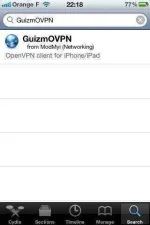
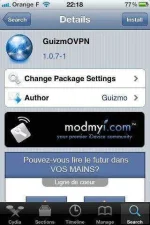
Select 'GuizmOVPN' and click 'Install'
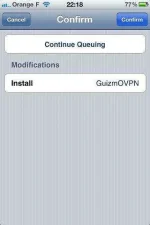
Select 'Confirm'
Select 'Restart SpringBoard'
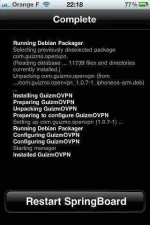
Check if GuizmOVPN is installed

Step 2. Prepare config bundles in SecurityKISS client area
Open You do not have permission to view the full content of this post. Log in or register now. and go to the 'Download' tab
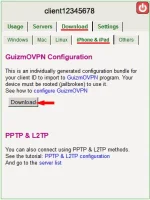
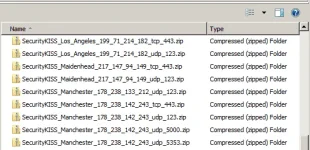
Download and unzip the bundle to a folder on your PC. Then it should contain the list of zip files. One per server configuration.
Step 3. Upload selected configuration to the iPhone/iPad device
On the device, run OpenVPN, go to the 'Settings' tab and activate the web server

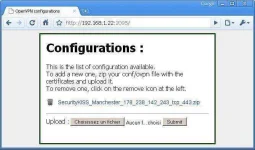
Go back to your PC, open a browser and go to your web server address
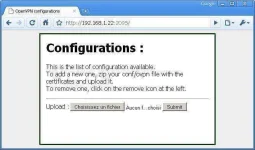
Click 'Select File' and select one of the zip files with configuration
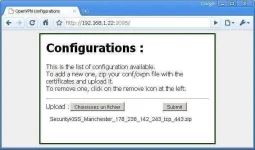
Click 'Submit'. The new certificate should appear in the list.
Step 4. Test the connection
Go back to your device. In the 'General' tab select the configuration you just uploaded.
Connect to the tunnel using 'Connect' switch

You can verify if your IP address has changed by opening our geolocation website: You do not have permission to view the full content of this post. Log in or register now.

You can set up other servers from the list in similar way.
This tutorial describes how to configure OpenVPN connection to SecurityKISS servers using GuizmOVPN program.
GuizmOVPN is a third party shareware software and you can use it without restrictions for 7 days.
The installation requires a rooted (jailbroken) device. See You do not have permission to view the full content of this post. Log in or register now. for details.
Step 1. Install GuizmOVPN from Cydia
Open Cydia and go to the 'Search' tab and search for 'GuizmOVPN'
Select 'GuizmOVPN' and click 'Install'
Select 'Confirm'
Select 'Restart SpringBoard'
Check if GuizmOVPN is installed
Step 2. Prepare config bundles in SecurityKISS client area
Open You do not have permission to view the full content of this post. Log in or register now. and go to the 'Download' tab
Download and unzip the bundle to a folder on your PC. Then it should contain the list of zip files. One per server configuration.
Step 3. Upload selected configuration to the iPhone/iPad device
On the device, run OpenVPN, go to the 'Settings' tab and activate the web server
Go back to your PC, open a browser and go to your web server address
Click 'Select File' and select one of the zip files with configuration
Click 'Submit'. The new certificate should appear in the list.
Step 4. Test the connection
Go back to your device. In the 'General' tab select the configuration you just uploaded.
Connect to the tunnel using 'Connect' switch
You can verify if your IP address has changed by opening our geolocation website: You do not have permission to view the full content of this post. Log in or register now.
You can set up other servers from the list in similar way.