PH
PH
Update: Realme 8 | UpdatesChangelog:
This release addresses some of the known issues with previous builds and includes general improvements.
• Update the Android security ρá†ch level to 5 July 2022
• Sync with latest LOS changes (full black for dark mode and more!)
• Fix buggy hardware video playback
• Add background service to fix gain control for earpiece speaker
• Switch to linear brightness scaling
• Expose auxiliary cameras to third party apps
• Add HotwordEnrollment blobs (fixes "Ok Google" trigger)
• Attempt to stop "Serial console is enabled" notification from appearing on certain regional firmwares
• Fix DRM L1
• MASSIVE vendor debloat (~620MB reduction in size)
• Rebased kernel over official Realme kernel source
Notes:
• Only use RealmeUI 3 firmware
• If anything else is broken, report it.
Credits:
@R0rt1z2
@minatiscape
@TheMalachite
by @bengris32
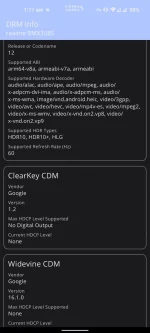
This rom supports HDR, HDR10+
almost 0% idle battery drain
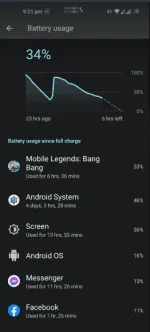
10+hours Screen-on Time(based on my normal usage)
LineageOS is a free, community-built, aftermarket firmware distribution of Android 12L, which is designed to increase performance and reliability over stock Android for your device.
LineageOS is based on the Android Open Source Project with extra contributions from many Android community members. It can be used without any need to have any Google application installed. Linked below is a package from another Android project that restores the Google parts. LineageOS still includes various hardware-specific code, which is also slowly being open-sourced.
All the source code for LineageOS is available in the LineageOS You do not have permission to view the full content of this post. Log in or register now.. And if you would like to contribute to LineageOS, please visit the You do not have permission to view the full content of this post. Log in or register now.. You can also view the You do not have permission to view the full content of this post. Log in or register now. for a complete list of changes & features.
You do not have permission to view the full content of this post. Log in or register now.bengris32-You do not have permission to view the full content of this post. Log in or register now.
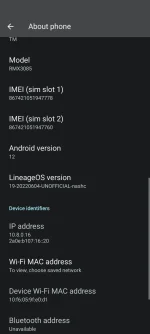
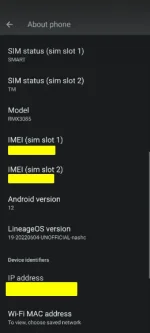
SCREENSHOTS

Screen-on time:
TRIED AND TESTED by me.
-Pc
-Realme 8
WARNING: -Proceeding will wipe your important files/data and ensure that you back it up.
-Will void your warranty.
NOTE: This only work on REALMEUI 3.0; prefer v.C.08. My version when i flashed is c.09.
Unlocking Bootloader via the deep testing app:
Deeptesting app is tested in VN and PH rom region.
Step 1: Download and install You do not have permission to view the full content of this post. Log in or register now.
tap "Apply Now" and accept the agreement; you should see this:
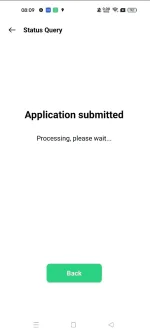
Step 2: Wait for 3 to 5 minutes, close the app and reopen again, tap "Query verification status," and you should see this:
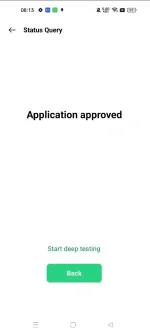
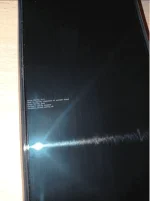
This means your device now has unlocked fastboot access; tap "Start deep testing," and the device will reboot to fastboot mode.
DOWNLOAD AND EXTRACT PLATFORM TOOLS FROM THEIR SITE. You do not have permission to view the full content of this post. Log in or register now..
open platform tools folder run cmd in file path.
Now type
Code:
fastboot flashing unlockFlashing(can't provide screenshots, mistakenly deleted)
CUT/COPY AND PASTE You do not have permission to view the full content of this post. Log in or register now. and You do not have permission to view the full content of this post. Log in or register now. PUT THEM INSIDE THE PLATFORM TOOLS FOLDER
enter cmd in pathbar which platformtools are located run this commands:
Code:
fastboot --disable-verity --disable-verification flash vbmeta vbmeta.img
Code:
fastboot flash recovery recovery.img
Code:
fastboot reboot recoveryFLASHING LOS ROM
DOWNLOAD DON'T EXTRACT AND CUT/COPY You do not have permission to view the full content of this post. Log in or register now. INSIDE PLATFORM-TOOLS FOLDER
We are in LOS recovery to flash the ROM and navigate to the ff steps:
- Factory reset > Format data/factory reset
- Apply update > Apply from ADB
go back to your pc run cmd inside platform-tools
run
Code:
adb sideload lineage-19.1-20220604-UNOFFICIAL-nashc.zipAfter successful installation, please note that LineageOS does not come with any GApps included; we must flash them ourselves.
NIKGAPPS MUST ALSO BE INSIDE PLATFORMTOOLS.
You do not have permission to view the full content of this post. Log in or register now.
run
Code:
adb sideload (name of the NIKGAPPS FILE)Known Issues:
Widevine Security only level L3.
Doubletap to wake not working
SELinux is in Permissive mode
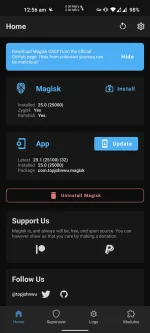
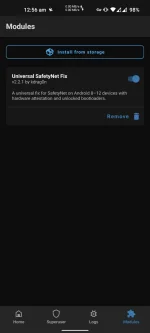
IF YOU DAILY DRIVE WITH LOS AND USE GCASH OR OTHER BANKING APPS, I SUGGEST FLASHING MAGISK AND INSTALLING A SAFETY NET FIX. watch the tutorial on youtube.
©Realme 8 | Official | Discussion ™ Realme 8 | Updates
You do not have permission to view the full content of this post. Log in or register now. for the custom rom development
Thank you and Enjoy LOS!