 PH
PHS A K A T A
Elite
yes po ibang file poibang file po ba yan? kung ibang file po yan,
gagawin niyo pong action="" sa form yan
yes po ibang file poibang file po ba yan? kung ibang file po yan,
gagawin niyo pong action="" sa form yan
kung ganun po, action="filenameniyan.php" ganyan po gagawin niyo sa form.yes po ibang file po
kung ganun po, action="filenameniyan.php" ganyan po gagawin niyo sa form.
<button class="btn btn-sm btn-success mr-2" form="manage-user">Save</button>mnage user.php po sya yun na po yunat saka kung ibang file po yan at action="" lang po nakalagay dun, ibig sabihin po sa mismong php file na yun (yung form) mag sesend yung request po
ito po yung whole code ng manage user .phpat saka kung ibang file po yan at action="" lang po nakalagay dun, ibig sabihin po sa mismong php file na yun (yung form) mag sesend yung request po
<?php
if(isset($_GET['id']) && $_GET['id'] > 0){
    $user = $conn->query("SELECT * FROM users where id ='{$_GET['id']}'");
    foreach($user->fetch_array() as $k =>$v){
        $meta[$k] = $v;
    }
}
?>
<?php if($_settings->chk_flashdata('success')): ?>
<script>
    alert_toast("<?php echo $_settings->flashdata('success') ?>",'success')
</script>
<?php endif;?>
<div class="card card-outline card-primary">
    <div class="card-body">
        <div class="container-fluid">
            <div id="msg"></div>
            <form action="" id="manage-user">
                <input type="hidden" name="id" value="<?php echo isset($meta['id']) ? $meta['id']: '' ?>">
                <div class="form-group col-6">
                    <label for="name">First Name</label>
                    <input type="text" name="firstname" id="firstname" class="form-control" value="<?php echo isset($meta['firstname']) ? $meta['firstname']: '' ?>" required>
                </div>
                <div class="form-group col-6">
                    <label for="name">Last Name</label>
                    <input type="text" name="lastname" id="lastname" class="form-control" value="<?php echo isset($meta['lastname']) ? $meta['lastname']: '' ?>" required>
                </div>
                <div class="form-group col-6">
                    <label for="username">Username</label>
                    <input type="text" name="username" id="username" class="form-control" value="<?php echo isset($meta['username']) ? $meta['username']: '' ?>" required  autocomplete="off">
                </div>
                <div class="form-group col-6">
                    <label for="password">Password</label>
                    <input type="password" name="password" id="password" class="form-control" value="" autocomplete="off" <?php echo isset($meta['id']) ? "": 'required' ?>>
                    <?php if(isset($_GET['id'])): ?>
                    <small class="text-info"><i>Leave this blank if you dont want to change the password.</i></small>
                    <?php endif; ?>
                </div>
                <div class="form-group col-6">
                    <label for="type">User Type</label>
                    <select name="type" id="type" class="custom-select"  required>
                        <option value="1" <?php echo isset($meta['type']) && $meta['type'] == 1 ? 'selected': '' ?>>Administrator</option>
                        <option value="2" <?php echo isset($meta['type']) && $meta['type'] == 2 ? 'selected': '' ?>>Staff</option>
                        <option value="3" <?php echo isset($meta['type']) && $meta['type'] == 3 ? 'selected': '' ?>>Process Owner</option>
                        <option value="4" <?php echo isset($meta['type']) && $meta['type'] == 4 ? 'selected': '' ?>>Auditor</option>
                        <option value="5" <?php echo isset($meta['type']) && $meta['type'] == 5 ? 'selected': '' ?>>Auditor Lead</option>
                        <option value="6" <?php echo isset($meta['type']) && $meta['type'] == 6 ? 'selected': '' ?>>QAH</option>
                        <option value="7" <?php echo isset($meta['type']) && $meta['type'] == 7 ? 'selected': '' ?>>Team Management</option>
                        <option value="8" <?php echo isset($meta['type']) && $meta['type'] == 8 ? 'selected': '' ?>>Human Resource</option>
                    </select>
                </div>
                <div class="form-group col-6">
                    <label for="" class="control-label">Avatar</label>
                    <div class="custom-file">
                      <input type="file" class="custom-file-input rounded-circle" id="customFile" name="img" onchange="displayImg(this,$(this))">
                      <label class="custom-file-label" for="customFile">Choose file</label>
                    </div>
                </div>
                <div class="form-group col-6 d-flex justify-content-center">
                    <img src="<?php echo validate_image(isset($meta['avatar']) ? $meta['avatar'] :'') ?>" alt="" id="cimg" class="img-fluid img-thumbnail">
                </div>
            </form>
        </div>
    </div>
    <div class="card-footer">
            <div class="col-md-12">
                <div class="row">
                    <button class="btn btn-sm btn-success mr-2" form="manage-user">Save</button>
                    <a class="btn btn-sm btn-secondary" href="./?page=user/list">Cancel</a>
                </div>
            </div>
        </div>
</div>
<style>
    img#cimg{
        height: 15vh;
        width: 15vh;
        object-fit: cover;
        border-radius: 100% 100%;
    }
</style>
<script>
    $(function(){
        $('.select2').select2({
            width:'resolve'
        })
    })
    function displayImg(input,_this) {
        if (input.files && input.files[0]) {
            var reader = new FileReader();
            reader.onload = function (e) {
                $('#cimg').attr('src', e.target.result);
            }

            reader.readAsDataURL(input.files[0]);
        }
    }
    $('#manage-user').submit(function(e){
        e.preventDefault();
        var _this = $(this)
        start_loader()
        $.ajax({
            url:_base_url_+'classes/Users.php?f=save',
            data: new FormData($(this)[0]),
            cache: false,
            contentType: false,
            processData: false,
            method: 'POST',
            type: 'POST',
            success:function(resp){
                if(resp ==1){
                    location.href = './?page=user/list';
                }else{
                    $('#msg').html('<div class="alert alert-danger">Username already exist</div>')
                    $("html, body").animate({ scrollTop: 0 }, "fast");
                }
                end_loader()
            }
        })
    })

</script>ang komplikado po talaga hahaha nasa jquery yung requestmnage user.php po sya yun na po yun
ito po yung whole code ng manage user .php
PHP:<?php if(isset($_GET['id']) && $_GET['id'] > 0){ $user = $conn->query("SELECT * FROM users where id ='{$_GET['id']}'"); foreach($user->fetch_array() as $k =>$v){ $meta[$k] = $v; } } ?> <?php if($_settings->chk_flashdata('success')): ?> <script> alert_toast("<?php echo $_settings->flashdata('success') ?>",'success') </script> <?php endif;?> <div class="card card-outline card-primary"> <div class="card-body"> <div class="container-fluid"> <div id="msg"></div> <form action="" id="manage-user"> <input type="hidden" name="id" value="<?php echo isset($meta['id']) ? $meta['id']: '' ?>"> <div class="form-group col-6"> <label for="name">First Name</label> <input type="text" name="firstname" id="firstname" class="form-control" value="<?php echo isset($meta['firstname']) ? $meta['firstname']: '' ?>" required> </div> <div class="form-group col-6"> <label for="name">Last Name</label> <input type="text" name="lastname" id="lastname" class="form-control" value="<?php echo isset($meta['lastname']) ? $meta['lastname']: '' ?>" required> </div> <div class="form-group col-6"> <label for="username">Username</label> <input type="text" name="username" id="username" class="form-control" value="<?php echo isset($meta['username']) ? $meta['username']: '' ?>" required autocomplete="off"> </div> <div class="form-group col-6"> <label for="password">Password</label> <input type="password" name="password" id="password" class="form-control" value="" autocomplete="off" <?php echo isset($meta['id']) ? "": 'required' ?>> <?php if(isset($_GET['id'])): ?> <small class="text-info"><i>Leave this blank if you dont want to change the password.</i></small> <?php endif; ?> </div> <div class="form-group col-6"> <label for="type">User Type</label> <select name="type" id="type" class="custom-select" required> <option value="1" <?php echo isset($meta['type']) && $meta['type'] == 1 ? 'selected': '' ?>>Administrator</option> <option value="2" <?php echo isset($meta['type']) && $meta['type'] == 2 ? 'selected': '' ?>>Staff</option> <option value="3" <?php echo isset($meta['type']) && $meta['type'] == 3 ? 'selected': '' ?>>Process Owner</option> <option value="4" <?php echo isset($meta['type']) && $meta['type'] == 4 ? 'selected': '' ?>>Auditor</option> <option value="5" <?php echo isset($meta['type']) && $meta['type'] == 5 ? 'selected': '' ?>>Auditor Lead</option> <option value="6" <?php echo isset($meta['type']) && $meta['type'] == 6 ? 'selected': '' ?>>QAH</option> <option value="7" <?php echo isset($meta['type']) && $meta['type'] == 7 ? 'selected': '' ?>>Team Management</option> <option value="8" <?php echo isset($meta['type']) && $meta['type'] == 8 ? 'selected': '' ?>>Human Resource</option> </select> </div> <div class="form-group col-6"> <label for="" class="control-label">Avatar</label> <div class="custom-file"> <input type="file" class="custom-file-input rounded-circle" id="customFile" name="img" onchange="displayImg(this,$(this))"> <label class="custom-file-label" for="customFile">Choose file</label> </div> </div> <div class="form-group col-6 d-flex justify-content-center"> <img src="<?php echo validate_image(isset($meta['avatar']) ? $meta['avatar'] :'') ?>" alt="" id="cimg" class="img-fluid img-thumbnail"> </div> </form> </div> </div> <div class="card-footer"> <div class="col-md-12"> <div class="row"> <button class="btn btn-sm btn-success mr-2" form="manage-user">Save</button> <a class="btn btn-sm btn-secondary" href="./?page=user/list">Cancel</a> </div> </div> </div> </div> <style> img#cimg{ height: 15vh; width: 15vh; object-fit: cover; border-radius: 100% 100%; } </style> <script> $(function(){ $('.select2').select2({ width:'resolve' }) }) function displayImg(input,_this) { if (input.files && input.files[0]) { var reader = new FileReader(); reader.onload = function (e) { $('#cimg').attr('src', e.target.result); } reader.readAsDataURL(input.files[0]); } } $('#manage-user').submit(function(e){ e.preventDefault(); var _this = $(this) start_loader() $.ajax({ url:_base_url_+'classes/Users.php?f=save', data: new FormData($(this)[0]), cache: false, contentType: false, processData: false, method: 'POST', type: 'POST', success:function(resp){ if(resp ==1){ location.href = './?page=user/list'; }else{ $('#msg').html('<div class="alert alert-danger">Username already exist</div>') $("html, body").animate({ scrollTop: 0 }, "fast"); } end_loader() } }) }) </script>
paps ma edit pa bo ba yung value nya naka set sa 1 and 2? {type attribute?} feel ko dyan yung problemaat saka kung ibang file po yan at action="" lang po nakalagay dun, ibig sabihin po sa mismong php file na yun (yung form) mag sesend yung request po

ano po yan database po ba yanpaps ma edit pa bo ba yung value nya naka set sa 1 and 2? {type attribute?} feel ko dyan yung problema
View attachment 1997711
yes po sqlano po yan database po ba yan

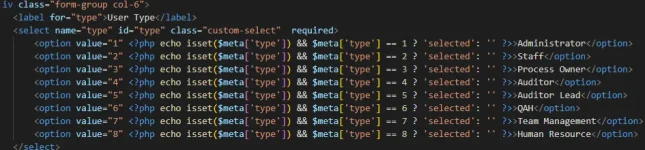
<div class="form-group col-6">
    <label for="type">User Type</label>
    <select name="type" id="type" class="custom-select"  required>
        <option value="1">Administrator</option>
        <option value="2">Staff</option>
        <option value="3">Process Owner</option>
        <option value="4">Auditor</option>
        <option value="5">Auditor Lead</option>
        <option value="6">QAH</option>
        <option value="7">Team Management</option>
        <option value="8">Human Resource</option>
    </select>
</div>cge waittry niyo nga pong ganto nalang gawin niyo
HTML:<div class="form-group col-6"> <label for="type">User Type</label> <select name="type" id="type" class="custom-select" required> <option value="1">Administrator</option> <option value="2">Staff</option> <option value="3">Process Owner</option> <option value="4">Auditor</option> <option value="5">Auditor Lead</option> <option value="6">QAH</option> <option value="7">Team Management</option> <option value="8">Human Resource</option> </select> </div>
ayaw pa din yan lumabs senilect ko auditortry niyo nga pong ganto nalang gawin niyo
HTML:<div class="form-group col-6"> <label for="type">User Type</label> <select name="type" id="type" class="custom-select" required> <option value="1">Administrator</option> <option value="2">Staff</option> <option value="3">Process Owner</option> <option value="4">Auditor</option> <option value="5">Auditor Lead</option> <option value="6">QAH</option> <option value="7">Team Management</option> <option value="8">Human Resource</option> </select> </div>

yown feel ko ditos databse yung malipalagay ko naka ENUM yung column boss
ang gawin mo, delete mo yung 'type' na column tapos gawa ka ulet column name na 'type' sa mismong position niya
so halimbawa ganto, DROP mo yung column name na 'type' tapos gawa ka ulet ng column name na 'type' after last_login at before status
tama ba?so halimbawa ganto, DROP mo yung column name na 'type' tapos gawa ka ulet ng column name na 'type' after last_login at before status
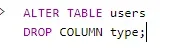
yes ponaka phpmyadmin po ba kayo
ito paps na edit kona ano dapat dito?naka phpmyadmin po ba kayo

hindi paps enedit ko lngano ginawa mo paps? dinelete mo buong table?
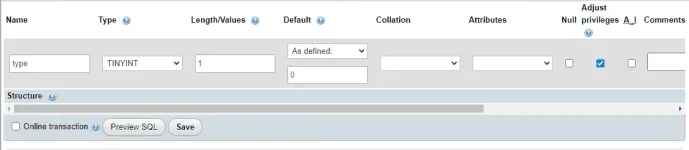
ALTER TABLE users DROP COLUMN type;ALTER TABLE `users`
ADD COLUMN `type` INT(10) NOT NULL
AFTER `last_login`;