 PH
PHPHC_INTIA123
Fanatic
FIRST
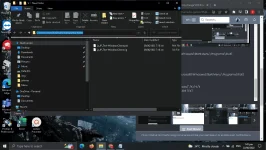
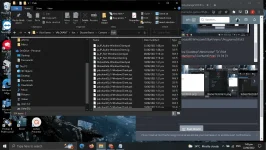
GO TO RIOT GAMES FILE
CLICK VALORANT\LIVE\SHOOTERGAME\CONTENT\PAKS
COPY THE en_US_Text-WindowsClient.sig, en_US_Text-WindowsClient.pak
move to other folder rename them as
ja_JP_Text-WindowsClient.sig , ja_JP_Text-WindowsClient.pak
SECOND
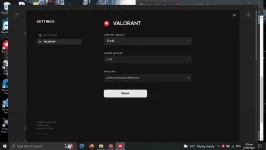
CHANGE VALORANT LANGUAGE TO JAPANESE
THIRD
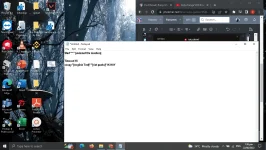
[COMMAND PASTE THIS AT NOTEPAD]
Start "" " C:\ProgramData\Microsoft\Windows\Start Menu\Programs\Riot\ Games\VALORANT
Timeout 15
xcopy "[english Text]" "[riot packs]" /K /H /Y
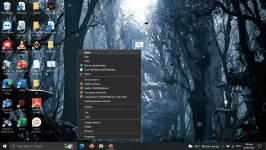
VALORANT FILE LOCATION
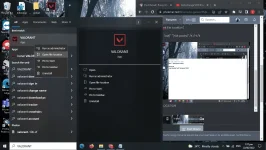
CLICK OPEN FILE LOCATION
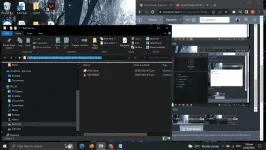
COPY THE FILE LOCATION
C:\ProgramData\Microsoft\Windows\Start Menu\Programs\Riot\ Games\VALORANT
ADD VALORANT AT END
Start "" " C:\ProgramData\Microsoft\Windows\Start Menu\Programs\Riot\ Games\VALORANT
Timeout 15
xcopy "[english Text]" "[riot packs]" /K /H /Y
COPY FILE LOCATION OF ENGLISH TEXT
Start "" " C:\ProgramData\Microsoft\Windows\Start Menu\Programs\Riot\ Games\VALORANT
Timeout 15
xcopy "C:\Users\intia\OneDrive\Desktop\New folder" "D:\Riot Games\VALORANT\live\ShooterGame\Content\Paks" /K /H /Y
Start "" " C:\ProgramData\Microsoft\Windows\Start Menu\Programs\Riot\ Games\VALORANT
Timeout 15
xcopy "C:\Users\intia\OneDrive\Desktop\New folder" "D:\Riot Games\VALORANT\live\ShooterGame\Content\Paks" /K /H /Y
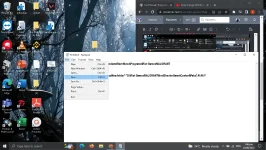
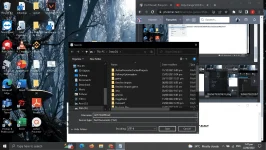
must have .bat to work
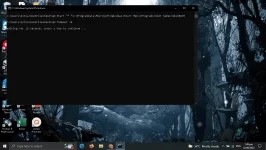
done...
GO TO RIOT GAMES FILE
CLICK VALORANT\LIVE\SHOOTERGAME\CONTENT\PAKS
COPY THE en_US_Text-WindowsClient.sig, en_US_Text-WindowsClient.pak
move to other folder rename them as
ja_JP_Text-WindowsClient.sig , ja_JP_Text-WindowsClient.pak
SECOND
CHANGE VALORANT LANGUAGE TO JAPANESE
THIRD
[COMMAND PASTE THIS AT NOTEPAD]
Start "" " C:\ProgramData\Microsoft\Windows\Start Menu\Programs\Riot\ Games\VALORANT
Timeout 15
xcopy "[english Text]" "[riot packs]" /K /H /Y
VALORANT FILE LOCATION
CLICK OPEN FILE LOCATION
COPY THE FILE LOCATION
C:\ProgramData\Microsoft\Windows\Start Menu\Programs\Riot\ Games\VALORANT
ADD VALORANT AT END
Start "" " C:\ProgramData\Microsoft\Windows\Start Menu\Programs\Riot\ Games\VALORANT
Timeout 15
xcopy "[english Text]" "[riot packs]" /K /H /Y
COPY FILE LOCATION OF ENGLISH TEXT
Start "" " C:\ProgramData\Microsoft\Windows\Start Menu\Programs\Riot\ Games\VALORANT
Timeout 15
xcopy "C:\Users\intia\OneDrive\Desktop\New folder" "D:\Riot Games\VALORANT\live\ShooterGame\Content\Paks" /K /H /Y
Start "" " C:\ProgramData\Microsoft\Windows\Start Menu\Programs\Riot\ Games\VALORANT
Timeout 15
xcopy "C:\Users\intia\OneDrive\Desktop\New folder" "D:\Riot Games\VALORANT\live\ShooterGame\Content\Paks" /K /H /Y
must have .bat to work
done...