🔒 Closed need help for stock rom on myphone rio craze privacy protection

Status
Not open for further replies.

skyDevil09

Fanatic
help naman po need ko stock rom for myphone rio craze..sana po matulungan mu ako dead yung cp peru still detected sa computer.may mga nkita ako na stock rom sa google kaso d gumagana..thanks in adcance
 
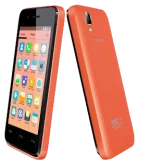
MYPHONE RIO CRAZE STOCK ROM / FIRMWARE TO UNBRICK YOUR PHONE

There is a tutorial below that you can follow.


craze-orange.webp


"Download these files"
Firmware Here -->You do not have permission to view the full content of this post. Log in or register now.VCOM Driver -->You do not have permission to view the full content of this post. Log in or register now.
Alternative Driver --> You do not have permission to view the full content of this post. Log in or register now.
SPFlashTool --> You do not have permission to view the full content of this post. Log in or register now.

"Use WinRar or 7zip to extract the firmware"
"Extract the files to your desired folder"
"If you encounter error in flashtool, use different version of it."
"I suggest to use 32bit Windows OS for compatibility of the driver"

 
thanks po peru already done ko na po ito..na dead lang yung cp ko ayaw a mag on peru nadedetect pa sya sa pc..hehehe
 
Gamitin mo yung Flash tools included na sa firmware

1. Extract your downloaded Stock ROM to Desktop.

2. Extract to your Desktop and Open SP Flash Tool.

3. On SP Flash Tool click “Scatter-loading” button.a. Locate your downloaded stock rom.b. Select “MT65xx_Android_scatter_emmc.txt”. Wait files to be added in to SP Flash Tool.

4. Turn off your phone and remove battery.

5. Click “Download” button or press F9 button.

6. Connect your phone to your computer using a USB Cable.

7. The process will start, wait until a green circle will pop up. And you’re finished!You can now safely disconnect your phone and turn it on.

DOWNLOAD LINK:

You do not have permission to view the full content of this post. Log in or register now.[/url]
 
nunung umpisa bootloop tapos hardreset ko bootloop parin..tapos po flash ko ulit yung firmware tapos yun dead na hahaha

maaayos pa po ba yung cp ko?
 
cge po ulitin ko po :-) natry ko na lahat yan hehe sp flash tool din gamit ko..thanks po feedback po ako kung may himala.hahaha
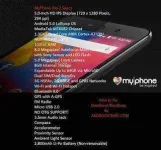
 
How to Fix Deadboot/Bootloop Myphone Rio 2
myphone-rio2.webp


Requirements:
PC
USB CABLE

You do not have permission to view the full content of this post. Log in or register now.
1. Download the Official Stock ROM of Akoaytuwid: You do not have permission to view the full content of this post. Log in or register now.
Password: akoaytuwidisback
2. Extract the archive and you will get 3 folders like this:


3. Open Flashtool folder and locate "flash_tool.exe". Manually locate the scatter file. [Nasa folder na Akoaytuwid > Rio2 1.14 Update folder> MT6582_Android_scatter.txt]

4. After selecting the right scatter file, set the flasher tool to Firmware Update, then click Download button at the left top corner.
5. Power down your phone completely (wait 2-3 mins). Then connect your device to your computer (WITHOUT HOLDING ANY BUTTONS. Inuulit ko, walang pipindutin habang kinokonek ang device sa PC). Wait for the flasher to finish its job.


6. If you've done it right, you should get this screen:

7. ENJOY! Happy Flashing! :)
Credits:
Akoaytuwid
Rio 2 group


yan pa po try mo boss

di tayo titigil gang di nabubuhay phone mo :LOL:
 
invalid po yan hehe..d compatible mag iba po kasi chip ni myphone craze at rio2..natry ko na po kasi din mgflash ng ibang firmware peru invalid daw po sabi ng sp flash tool

hahaha cge po slamat im advance
 
Status
Not open for further replies.

About this Thread

  • 26
    Replies
  • 4K
    Views
  • 2
    Participants
Last reply from:
skyDevil09

Trending Topics

Online now

Members online
837
Guests online
703
Total visitors
1,540

Forum statistics

Threads
2,275,560
Posts
28,964,083
Members
1,231,863
Latest member
Tuytoy
Back
Top