🔒 Closed Recommended fix for disabled Windows Update.

Status
Not open for further replies.

Kristian G

Leecher
I got a Windows 10 product key last year from this site.
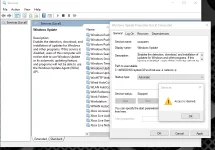
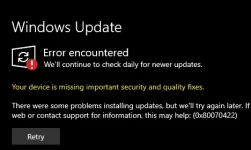
Now I'm trying to update some apps, but it's giving me an error (please see attached photos).
Tried some troubleshooting steps I found for this but it doesn't help.
Tried updating it thru Services, but it says "Access Denied".
Are there other ways to fix this?

1.webp 2.webp 3.webp
 
it seems that you dont have the administrative privilege to activate the windows update or your windows copy has permanently disabled the windows update feature
I have checked, I'm logged in as Admin.
If the copy has permanently disabled update, do I need to install a new one? O r should I just buy a new product key?
 
If the copy has permanently disabled update, do I need to install a new one? O r should I just buy a new product key?

no need to buy a new key, just re-install your windows with the same key and along the process, you will be asked (cortana) on update and security preference and toggle it to allow... then if possible, update your windows 10 to the latest build... if you are annoyed with the win update, my way of stopping it is by using group policy editor, not windows services or pause update....
 
Status
Not open for further replies.

About this Thread

  • 6
    Replies
  • 234
    Views
  • 5
    Participants
Last reply from:
outsidecap

Online now

Members online
964
Guests online
885
Total visitors
1,849

Forum statistics

Threads
2,276,251
Posts
28,968,671
Members
1,231,183
Latest member
Highness08
Back
Top