 PH
PHja_mario14
Fanatic
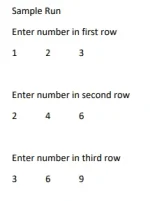
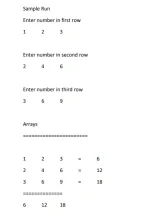
Pahelp po Paano po makakagawa ng User input in a same line gamit ang 3x3 array?
using System;

namespace ConsoleApp1
{
    class Program
    {
        static void Main(string[] args)
        {
            int[,] input = new int[3, 3];
            string[] rowName = new string[3] { "first","second","third"};

            for (int row = 0; row < 3; row++)
            {
                Console.WriteLine(String.Format("Enter three numbers in {0} row separated by space", rowName[row]));
                string[] s = Console.ReadLine().Split();

                int index = 0;
                for (int inputIndex=0;inputIndex<3;inputIndex++)
                {
                    input[row, index] = int.Parse(s[inputIndex]);
                    index++;
                }
            }

            //only if output is needed
            foreach(int item in input)
            {
                Console.Write(item.ToString() + " ");
            }

            Console.ReadKey(true);

        }


    }
}
C#:using System; namespace ConsoleApp1 { class Program { static void Main(string[] args) { int[,] input = new int[3, 3]; string[] rowName = new string[3] { "first","second","third"}; for (int row = 0; row < 3; row++) { Console.WriteLine(String.Format("Enter three numbers in {0} row separated by space", rowName[row])); string[] s = Console.ReadLine().Split(); int index = 0; for (int inputIndex=0;inputIndex<3;inputIndex++) { input[row, index] = int.Parse(s[inputIndex]); index++; } } //only if output is needed foreach(int item in input) { Console.Write(item.ToString() + " "); } Console.ReadKey(true); } } }