 PH
PHWeasleyyyyy
Eternal Poster
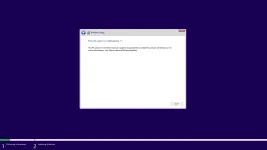
Lagi ng ganto mga priiii, ano bang kleqangan kong gawin fito. Halos lahat ng mga post dito nagamit ko na pero eto at eto pa tin nalabas.
inoff ko na yung windows update ko kasi alam kong magkakaproblema kung naka on yun, lalo na hindi genuine yung os. manual ko nlng ina-update yung mga kailangan file like .DDLNakaka receive ba ng updates yung ghost spectre version ?
Yun lang medyo hassle, yung sakin genuine license na carried simula windows 7 oem to 11 hahahinoff ko na yung windows update ko kasi alam kong magkakaproblema kung naka on yun, lalo na hindi genuine yung os. manual ko nlng ina-update yung mga kailangan file like .DDL
asahan mo na lagi na magkakaroon ng problema ang os mo kapag nag update ka kasi nadedetect ni microsoft agad yung os mo kung ρáíd ba o ***** lang. kaya suggest ko na lang na ioff mo nalang yung update para safe. then manual ka nalang mag search ng mga kailangang file.
OoNakaka receive ba ng updates yung ghost spectre version ?
Sa ghost spectre updater pede ka mag update dun
yung os naguupdate paps?Oo
Sa ghost spectre updater pede ka mag update dun
Oo
Sa ghost spectre updater pede ka mag update dun
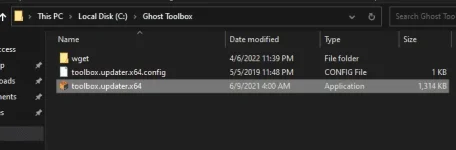
Di Yan Basta pag may update may lalabas dun sa toolbox pag binuksan mo kung may update dun maddl Yung standalone update dun ka mag update
ok lang ba mag update ng OS sa ghostspectre paps, hindi mag eerror? I mean baka mag install ulit ng bloatware si Windows 10 or maapektohan ang mga programs?Di Yan Basta pag may update may lalabas dun sa toolbox pag binuksan mo kung may update dun maddl Yung standalone update dun ka mag update
Basta sa ghost spectre ka mag update wag sa native windows update babalik sa original windows os mo wag mo I unpaused Yung windows updateok lang ba mag update ng OS sa ghostspectre paps, hindi mag eerror? I mean baka mag install ulit ng bloatware si Windows 10 or maapektohan ang mga programs?
Kahit Rufus lng lods may feature na sya auto remove para sa tpm and secure bootmeron ako solusyon dyan sa unsupported na pc sa w11 kaso need mo ng windows 10 iso at windows 11 iso then secret app na gagamitin para umandar ung trasnfer ng w11 iso sa w10 iso, dahil papasok mo ung iso ng windows 11 sa iso ng windows 10 para gumana ung iso installation ng w11.
boss paano po macheck if may TPM kahit 1.2 lang?
- Open Start.
- Search for regedit and click the top result to open the Registry Editor.
- Navigate to the following path. HKEY_LOCAL_MACHINE\SYSTEM\Setup\MoSetup
- Right-click the MoSetup (folder) key, select the New submenu and choose the DWORD (32-bit) Value option.
- Name the key AllowUpgradesWithUnsupportedTPMOrCPU and press Enter.
- Double-click the newly created key and set its value from 0 to 1.
- AllowUpgradesWithUnsupportedTPMOrCPU
- Click the OK button. After you complete the steps, you will be able to install Windows 11 on a device that does not have a supported processor or TPM 2.0 (TPM 1.2 will still be required).
Windows key + R, type mo tpm.msc then enter. Kung wala possible na hindi pa naka enable sa bios mo.boss paano po macheck if may TPM kahit 1.2 lang?
may isang pc kasi ako intel 2nd paWindows key + R, type mo tpm.msc then enter. Kung wala possible na hindi pa naka enable sa bios mo.