 PH
PHThere are several ways to download Torrent files directly to IDM. In this way, you are not essentially torrenting (the old way) because your traffic is no longer a P2P traffic from torrent clients. As a result, you will not be flagged by the ISP (if they restrict torrenting) and you will not be harming your VPN (if that vpn server is not allowed for torrenting, as most freely shared here are this way). Some of these methods are:
You can explore those listed above, but for now let's focus on Terabox to download torrent files to IDM.

- You do not have permission to view the full content of this post. Log in or register now. (direct link/not ref) - it is a seedbox service with freemium offerings. You can have bigger storage via referral links or by subscribing premium account.
- You do not have permission to view the full content of this post. Log in or register now. - another free service in the web to be able to download torrents for free.
- You do not have permission to view the full content of this post. Log in or register now. - send torrented files directly to your drive. (Be careful on this though, as google is checking copyrighted materials: link). By the way, also check this alternative as suggested by potatoXfries (link)
- Terabox - another cloud service with 1TB free storage.
You can explore those listed above, but for now let's focus on Terabox to download torrent files to IDM.
- Go to You do not have permission to view the full content of this post. Log in or register now. and create an account. You will get 1TB free storage.
- Now, find a torrent you want to download (ex: Spider-Man No Way Home) and copy the magnet link.
- In terabox main dashboard, click "Remote Upload"
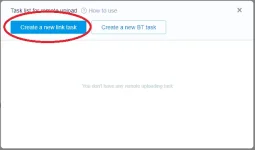
- In the following screen, click "Create a new link task" button.
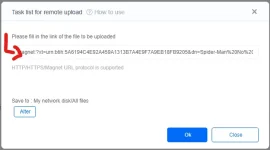
- And then, you see this screen where you will be able to upload HTTP/HHTTP/Magnet links. Magnet links are the ones used in torrenting so this is where we paste the torrent's magnet link.
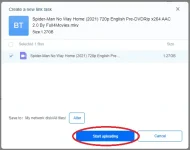
- Just click "ok" to proceed here, where you can choose which files to upload and which is not to include. (In this example, we only have 1 file within the torrent but some torrent have several contents like .srt files, images, and others. You can exclude them if you want.) After that, just press "Start Uploading"
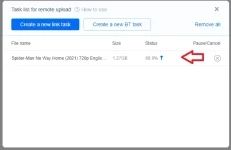
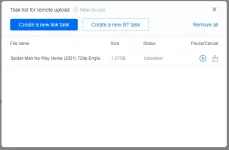
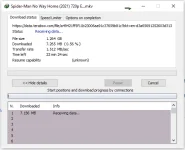
- And now, all we have to do is wait. You can even close terabox if you want, since that is a remote upload. How fast your upload completion depends on the seeder/leecher ratio of the torrent. After for a while it will be uploaded and you can download it to your IDM directly from terabox.
