 PH
PHThe "Always On Display" feature enables your device to show some information like the time, date, battery status, and any notifications even when the display is turned off .
The new enhance feature introduced four different designs: classic, blue, red, and green. It also includes many customized options and beautiful dynamic themes including animated watch faces, and you’ll be able to even type your own text like your signature or favorite slogans. With these new features, the Always On Display will provide you with a fresh look with every new glance.
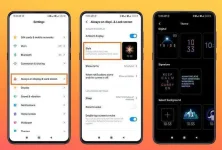
 Go to Settings
Tap on Always-on display & Lock screen
Turn on Ambient Display
Click on style and scroll all the way down to find -the Select Background option
Tap on the + sign
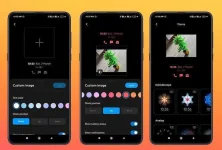
Click on the + sign at the center and select your favorite photo from your gallery
You can make changes to Text Color, Clock Position and Show battery status and notifications per your choice and preference
Tap to Apply
source:miuipdates/tips&tricks
The new enhance feature introduced four different designs: classic, blue, red, and green. It also includes many customized options and beautiful dynamic themes including animated watch faces, and you’ll be able to even type your own text like your signature or favorite slogans. With these new features, the Always On Display will provide you with a fresh look with every new glance.
Go to SettingsTap on Always-on display & Lock screenTurn on Ambient DisplayClick on style and scroll all the way down to find -the Select Background optionTap on the + signClick on the + sign at the center and select your favorite photo from your galleryYou can make changes to Text Color, Clock Position and Show battery status and notifications per your choice and preferenceTap to Applysource:miuipdates/tips&tricks
