 PH
PH-
Welcome to PHCorner Forums! Sign up for free to unlock full access and exclusive privileges, including:
- Asking questions about computer and mobile issues
- Discovering internet tips for your mobile network and computer
You are using an out of date browser. It may not display this or other websites correctly.
You should upgrade or use an alternative browser.
You should upgrade or use an alternative browser.
🔒 Closed Pa help po sana sa laptop internet connection
- Thread starter Frustrated Burger
- Start date
- Status
- Not open for further replies.
dark_cloud
Enthusiast
let's do it systematically.
1. check your ip configuration, so do
then look for both the gateway and dns.
2. ping both the gateway and dns by ip address, eg 192.168.1.1
3. if successful, try to ping external resource, eg 4.2.2.2.
4. if successful, now try to ping by hostname, eg google.com
5. if the test above fails, try to change your dns to 8.8.8.8 or 4.2.2.2
6. if it still fails, log in to your router and check the logs and any mac blacklisting.
1. check your ip configuration, so do
Code:
ipconfig /all2. ping both the gateway and dns by ip address, eg 192.168.1.1
3. if successful, try to ping external resource, eg 4.2.2.2.
4. if successful, now try to ping by hostname, eg google.com
5. if the test above fails, try to change your dns to 8.8.8.8 or 4.2.2.2
6. if it still fails, log in to your router and check the logs and any mac blacklisting.
dark_cloud
Enthusiast
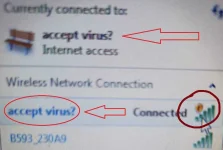
hindi dahil sa virus yan. SSID name lang yan which can be anything. pwede mo gawin, like 'FBI Van Outside' o kaya 'CIA Ops'.TS, na-trigger ang anti-virus mo. Mag-full scan ka para ma-resolve ang problema.
Tapos, mag-install ka ng 𝐌𝐚𝐥𝐰𝐚𝐫𝐞𝐛𝐲𝐭𝐞𝐬, mag-full scan ka uli.View attachment 1817375
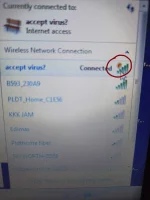
Paps, lumabas na yung yellow shield nung anti-virus sa tabi nung signal indicator.hindi dahil sa virus yan. SSID name lang yan which can be anything. pwede mo gawin, like 'FBI Van Outside' o kaya 'CIA Ops'.
dark_cloud
Enthusiast
boss, yung yellow shield indicates that you ARE connected to the access point but not to the wider internet.
Oops, na-prank pala tayo ni TS. Wala naman talagang problema internet connection niya.boss, yung yellow shield indicates that you ARE connected to the access point but not to the wider internet.
Gumamit siya ng access point, tapos ipinangalan niya yung SSID sa accept antivirus?
- Status
- Not open for further replies.
Similar threads
-
❓ Help LF Bully Anniversary Edition yung free sana sa laptop
- Started by Sxntl
- Replies: 1
-
About this Thread
-
8Replies
-
506Views
-
5Participants
Last reply from:
Pen_J
Pen_J
New Topics
-
Instagram Analytics na FREE
- Started by YellowParchment81
- Replies: 0
- ❓ Internet Questions
-
Paano gawin tong nsa vid? AI daw yan
- Started by Burnokik
- Replies: 0
- ❓ Internet Questions
-
ROYALE CABLE MESH
- Started by masrum101
- Replies: 0
- ❓ Internet Questions
-
Free E-sim w/ Data
- Started by Hypermood15
- Replies: 0
- ❓ Internet Questions
-
Blue app 10k followers
- Started by renvin1215
- Replies: 0
- ❓ Internet Questions
-
Freemium Vpn Tricks
- Started by jokejoke
- Replies: 0
- ❓ Internet Questions
-
Anong magandang fiber ISP?
- Started by RaizerRTX
- Replies: 8
- ❓ Internet Questions
-
H153-381 openline ??
- Started by PHC-winwyn
- Replies: 0
- ❓ Internet Questions
-
Mr beast auto send
- Started by mmj1829
- Replies: 7
- ❓ Internet Questions
Trending Topics
Online now
- Members online
- 647
- Guests online
- 1,980
- Total visitors
- 2,627