 PH
PHStep 1.
Run Android OS Recovery on Your PC
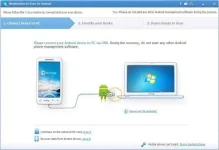
Firstly, download, install and launch Android OS Recovery on your computer. Make a connection between your bricked Android phone and the computer via USB cable. After that, click on "Fix My Bricked Phone" on the lower right corner of Android OS Recovery.
Step 2.
Get Your Bricked Android Phone into Download Mode
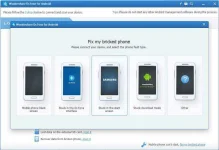
After making a connection between your bricked Android Phone and the computer, Android OS Recovery will pop up the window as below. You can choose one from the displayed situations on the popup window to continue.
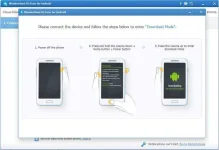
Then the program will ask you get the phone into Download Mode manually. You have to firstly power off your Android phone completely, then hold "Volume Down + Home + Power" on your Android phone together for a few seconds, at last, press "Volume +" button till the phone enter the download mode.
Step 3.
Detect the Android Phone
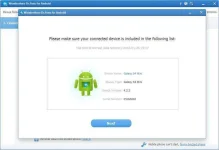
After your Android Phone enters Download Mode, Android OS Recovery will detect it and display the device model, Android version etc.
Step 4.
Restart Your Android Phone
Android OS Recovery will download the recovery package to help you fix the phone automatically and return it to normal state. After the downloading is complete, your Android phone will restart as a normal one so you can access your phone again.
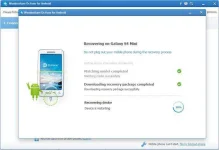
source:recoverandroid/ios
Run Android OS Recovery on Your PC
Firstly, download, install and launch Android OS Recovery on your computer. Make a connection between your bricked Android phone and the computer via USB cable. After that, click on "Fix My Bricked Phone" on the lower right corner of Android OS Recovery.
Step 2.
Get Your Bricked Android Phone into Download Mode
After making a connection between your bricked Android Phone and the computer, Android OS Recovery will pop up the window as below. You can choose one from the displayed situations on the popup window to continue.
Then the program will ask you get the phone into Download Mode manually. You have to firstly power off your Android phone completely, then hold "Volume Down + Home + Power" on your Android phone together for a few seconds, at last, press "Volume +" button till the phone enter the download mode.
Step 3.
Detect the Android Phone
After your Android Phone enters Download Mode, Android OS Recovery will detect it and display the device model, Android version etc.
Step 4.
Restart Your Android Phone
Android OS Recovery will download the recovery package to help you fix the phone automatically and return it to normal state. After the downloading is complete, your Android phone will restart as a normal one so you can access your phone again.
source:recoverandroid/ios

 hehe ,welcome always
 ,try mo baka effective