PH
PHairwavemac
тωєηту-мσяє

Adobe Photoshop 2022 v23.1.1.202 with NEURAL FILTERS
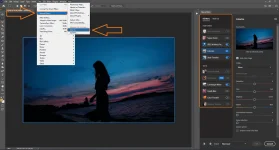
Now Neural Filters is Enabled even Without Signing In 
DownloadLINK (4.2gb)
You do not have permission to view the full content of this post.
Log in or register now.
NOTE: just Download Cr.a.ck and Filters ONLY if your Photoshop version is already v23.1.1.202.
NOTE: just Download Cr.a.ck and Filters ONLY if your Photoshop version is already v23.1.1.202.
DownloadLINK for Cr.a.ck and Filters ONLY (1.8gb)
You do not have permission to view the full content of this post. Log in or register now.
Eto po Video TUT
Heres How:
-Download the File and Extract it-run SETUP as Admin
after installing Photoshop open it then log in your google account then close the Program.
-Go back to your Downloaded Files
-Open Cr.a.ck WITHOUT filters Folder then Extract Cr.a.ck Fix then copy the extracted file
then go to C:\Program Files\Adobe\Adobe Photoshop 2022 then Paste/Replace the file.
-then Go back again to your Downloaded Files
-Open NGLEMP with Filters Cr.a.ck Folder then Extract Filters Cr.a.ck then from extracted file, copy INTERNAL folder
then go to C:\Users\"yourPCname"\AppData\Roaming\Adobe\UXP\PluginsStorage\PHSP\23\
then paste/replace the Folder.
-then go back to Filters Cr.a.ck Folder then copy these two files NGLEmp.8bx and painter.cfg
then go to C:\Program Files\Adobe\Adobe Photoshop 2022\Required\Plug-ins\Extensions
then paste the files.
-then Open Photoshop, sign out your Account..
then open Photoshop again then check if your neural filters is working..
if not, comment nalang.. Salamat!

 need ko na talaga mag upgrade
  sayang di ko maeexpercience yang neural filters
  salamat boss bagong tut nanaman