👨‍🏫 Tutorial Changing this Settings will save you Battery and Data [Android]

  • Thread starter Thread starter eerie
  • Start date Start date
Status
Not open for further replies.
E

eerie

Android default settings you need to turn off..

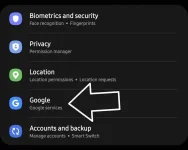
Go to Settings

Screenshot_20220203-181737_Settings.jpg


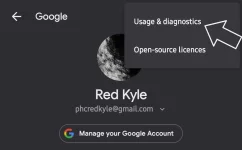
Screenshot_20220203-181806_Settings.jpg


Click on the 3 dots
Screenshot_20220203-182010_Google Play services.jpg


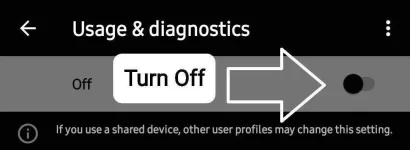
Turn off the usage & diagnostics
Screenshot_20220203-182100_Google Play services.jpg

Screenshot_20220203-182225_Google Play services.jpg


Next,

Go to Connections
Screenshot_20220203-182814_Settings.jpg


More connection settings
Screenshot_20220203-182926_Settings.jpg


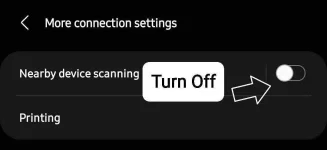
Turn off the 'nearby device scanning'
Screenshot_20220203-182943_Settings.jpg
 
Status
Not open for further replies.

About this Thread

  • 10
    Replies
  • 832
    Views
  • 10
    Participants
Last reply from:
miyacky23jhoan

Trending Topics

Online now

Members online
1,192
Guests online
1,173
Total visitors
2,365

Forum statistics

Threads
2,272,115
Posts
28,940,297
Members
1,237,998
Latest member
nyemf31
Back
Top