 PH
PHdemarcuscousin
Contributor
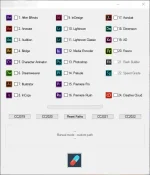
1. Register on You do not have permission to view the full content of this post. Log in or register now.
2. Download Creative Cloud from You do not have permission to view the full content of this post. Log in or register now.
3. After the installation, login to Creative Cloud, and click on "Try" on the apps you want to crack.
4. After you downloaded every app you want, log out from Creative Cloud.
5. Download the RAR file (You do not have permission to view the full content of this post. Log in or register now.) and extract it to your desktop.
6. Run "RunMe.exe", press on the CC button depending on which version you want to crack. For example: CC2020
7. Press on the medicine icon (Cure) to crack all apps. This process may take some time.
8. Done! You have successfully cracked Adobe apps.
Can I remove Adobe Creative Cloud from my system after cracking the apps?
You don't need to have Adobe Creative Cloud after you have cracked the apps. Please follow these steps if you would like to remove it from your system.
1. Download the official Creative Cloud Cleaner from Adobe: You do not have permission to view the full content of this post. Log in or register now.
2. Run "AdobeCreativeCloudCleanerTool.exe" with admin rights (right mouse click > open as administrator).
3. Choose your language and follow the steps.
4. Done! You have successfully removed Adobe Creative Cloud from your system.