🔒 Closed [6/19/16]- Android: RadioactiveVPN, Psiphon. PC: IHS+Psiphon, IHS+Proxifier, IHS Only.

Status
Not open for further replies.
salamat boss gumana na pero mas ok na rin i dagdag nyo narin ung screenshot pra mas ma intindihan rin ng iba, kasi hindi lang rin pala ako yung nag tatanong ng ganitong questions hehehe :D

Hehe,.Okay,.Ito na po.,Applicable din ito sa d mapagana ang IHS only no need na yung enable.bat and disable.bat file..Depende kasi yan sa connection kaya sa iba gumagana pero I think mostly d makaconnect lalo na pagbroadband yung gamit,.
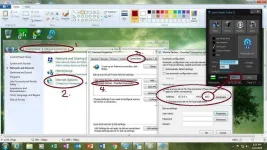
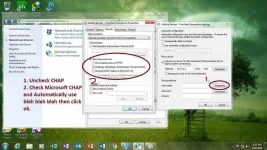
Kung mapapansin nyo sa Image 1 ang ginamit ko na port is 1603, dahil yan sa installed XAMPP ko nagkaconflict so I changed the port to 1603 actually you can make your own port as long as same yang port na gamit nyo sa IHS Listen port which is configured to 80. Ang Image number 2 naman optional lang yan, gagawin nyo lang yan kapag nakaranas kayo ng Required Authentication error yung nanghihinge ng Username at Password,.
Make sure na disconnected muna ang Network or Broadband nyo bago nyo econfigure ang nasa Image No. 2. Good Luck po sa inyong lahat and GOD Bless,.
 

Attachments

  • 1.webp
    1.webp
    157.3 KB · Views: 895
  • 2.webp
    2.webp
    155.2 KB · Views: 975
Hehe,.Okay,.Ito na po.,Applicable din ito sa d mapagana ang IHS only no need na yung enable.bat and disable.bat file..Depende kasi yan sa connection kaya sa iba gumagana pero I think mostly d makaconnect lalo na pagbroadband yung gamit,.
Kung mapapansin nyo sa Image 1 ang ginamit ko na port is 1603, dahil yan sa installed XAMPP ko nagkaconflict so I changed the port to 1603 actually you can make your own port as long as same yang port na gamit nyo sa IHS Listen port which is configured to 80. Ang Image number 2 naman optional lang yan, gagawin nyo lang yan kapag nakaranas kayo ng Required Authentication error yung nanghihinge ng Username at Password,. Good Luck po sa inyong lahat ang GOD Bless,.
Salamat dito try ko to maya (y)
 
ay teka...pd po ba to sa phone tethered?. wala kasi ako modem...android phone lng gamit ko tapos connect sa pc.

Please back read,.Read my post and that'll fix your problem,.No need to run enable.bat and disable.bat,.Just follow the instructions in Image No. 1,. :D
pano po pag blank si #4 sa image #1?
 
Hehe,.Okay,.Ito na po.,Applicable din ito sa d mapagana ang IHS only no need na yung enable.bat and disable.bat file..Depende kasi yan sa connection kaya sa iba gumagana pero I think mostly d makaconnect lalo na pagbroadband yung gamit,.
Kung mapapansin nyo sa Image 1 ang ginamit ko na port is 1603, dahil yan sa installed XAMPP ko nagkaconflict so I changed the port to 1603 actually you can make your own port as long as same yang port na gamit nyo sa IHS Listen port which is configured to 80. Ang Image number 2 naman optional lang yan, gagawin nyo lang yan kapag nakaranas kayo ng Required Authentication error yung nanghihinge ng Username at Password,.
Make sure na disconnected muna ang Network or Broadband nyo bago nyo econfigure ang nasa Image No. 2. Good Luck po sa inyong lahat ang GOD Bless,.

Yun salamat sa SS at sa additional info mo boss yan kasi yung hindi ko ma intindihan eh HEHEHE, madalas talaga yung Authentication error na need daw ng user at pass as of now no prob na yung connection ko salamat ng marami ulit dito :D
 
Yun salamat sa SS at sa additional info mo boss yan kasi yung hindi ko ma intindihan eh HEHEHE, madalas talaga yung Authentication error na need daw ng user at pass as of now no prob na yung connection ko salamat ng marami ulit dito :D
Walang anuman bossing para ating sa lahat naman to,.:D Tulong-tulong lang,.ENJOY :)

ay teka...pd po ba to sa phone tethered?. wala kasi ako modem...android phone lng gamit ko tapos connect sa pc.


pano po pag blank si #4 sa image #1?

Hindi yan blank,.Meaning nyan ay choose mo yung connection na gamit mo,.In your case d ko pa alam kung paano pero sige I'll try that method later pag-uwi ko sa bahay and update ako dito,.Okay? Mamayang gabi ko pamatry yang tethering,. :)
 
salamat paps janehl1403 antay ako mamaya.
e2 po ung sa #4 ko sa image #1. wala siya laman..You do not have permission to view the full content of this post. Log in or register now.

Meaning nyan ay you have no active connection.,Iba kasi yung gusto mo gawin, diba tethering yung gagawin mo? so different din po ang way para maka-access ka sa internet which is I need to try it since d ko pa natry ang tethering,.Update nalang ako mamayang gabi siguro,. :)
 
Meaning nyan ay you have no active connection.,Iba kasi yung gusto mo gawin, diba tethering yung gagawin mo? so different din po ang way para maka-access ka sa internet which is I need to try it since d ko pa natry ang tethering,.Update nalang ako mamayang gabi siguro,. :)
kaya pala wala..xD hahaha cg paps salamat ulit...
 
Currently testing: IDM stable downloading and smooth browsing. ^~^
IHS+Ultrasurf
nq7j2u.webp

Will update later for results. Stay tuned. ^~^
UPDATE: Slow but stable. Will add later.
 
~WELCOME TO PHC~

Hello mga ka PHC! ^~^ Wala ng paligoy-ligoy pa! Heto na.


Android Method 1 (Recommended):
RadioactiveVPN
Link:

Code:
Changelog:
[3/6/16] V1 - Initial release with 14 servers.
[3/6/16] V2 - Connection tweaks regarding to server, removed useless servers, added new servers with a total of 18.
[3/8/16] V3 - Removed useless servers, added new and updated old servers. With a total of 20 servers now.
[3/14/16] V4 - Replaced all the useless servers, with a total of 20 servers.
[3/19/16] V5 - All servers refurbished + 2 bonus servers.

Una sa lahat, gawa muna ng bagong APN:
Name: MGC (Kahit anong gusto niyo) ^~^
APN: You do not have permission to view the full content of this post. Log in or register now.

Btw, not working po ang MGC sa LTE simcard kaya hanap po kayo ng hindi LTE. Depende rin sa device kung nakasasagap ng LTE Signal.

Procedure:
  • Install
  • Connect
  • Enjoy ^~^
View attachment 48075
Kapag "Authentication Failed" retry lang po ng retry at kapag matagal, mabagal at may error minsan, wag na po mag-taka dahil marami tayong gumagamit.
Proxy credentials error? On/Off tayo ng data and try to reconnect.

Mabagal ba connection mo? Eto Premium Server import niyo na lang.
For ESTABLISHED MEMBERS ONLY:
Kapag di nagana minsan ang server it means nag-aupdate siya ng session or IP address. Mag-hintay lang hanggang matapos ang update at muling gagana na yan. Marami naman servers na choices kung hindi gagana yung iba diba?
Pero kung down na talaga, feel free to report agad saakin at ilista kung anong mga server. Thanks. ^~^

Android Method 2 (Optional):
Psiphon handler w/settings (Any version basta may handler pwede)

  • Link: You do not have permission to view the full content of this post. Log in or register now. V108 w/handler - Credits sa may gawa nito.
  • Link: You do not have permission to view the full content of this post. Log in or register now. Pro Lite w/handler (No ads and battery friendly) - Credits sa may gawa nito.
Handler:
Show on start: Checked
Remove port: Unchecked
Proxy type: Host
Custom Header: X-Online-Host
Proxy Server: m.globe.com.ph
Real Proxy type: No proxy
Real Proxy server: Radioactive
Real Proxy Port: 80

More Options
Proxy Settings:
Connect through HTTP:
Ticked
Use the following settings: Ticked
Host Address: 203.177.42.214
Port: 8080
View attachment 48076
Speedtest:
View attachment 48077

PC Method 1:
IHS + Psiphon
Download IHS here:
You do not have permission to view the full content of this post. Log in or register now.
Download latest Psiphon here: You do not have permission to view the full content of this post. Log in or register now.
~Wala ng gagalawin sa settings ni IHS dahil configured ko na yan.
Procedure:
1. Open IHS and start.
2. Open Psiphon, go to settings-local proxy ports.
HTTP/HTTPS: 8080
SOCKS: 1080
3. Then head to upstream proxy.
Hostname: 127.0.0.1
Port: 80
4. Click Appy changes. Connect Psiphon and you're good to go. ^~^
Kapag mag-dadownload gamit si IDM kay Psiphon, eto ang settings:
Proxy:
127.0.0.1
Port: 8080
Note: Stable na ang download mo nyan kay IDM dahil naka-tunnel siya kay Psiphon. Thanks to Sir [B]boytulog67[/B] for pointing this out (Basta ang port dapat ng IDM mo ay katulad kay Psiphon).
Enjoy! ^~^
View attachment 48107

PC Method 2:
IHS + Proxifier
Download IHS here:
You do not have permission to view the full content of this post. Log in or register now.
Download Proxifier here: You do not have permission to view the full content of this post. Log in or register now.
~Wala ng gagalawin sa settings ng dalawang yan dahil configured ko na yan.
Procedure:
1. Open IHS and start.
2. Open Proxifier.
3. You're all set. Browse now. ^~^
View attachment 48108
Enjoy! ^~^

PC Method 3:
IHS only (Like tunnel whole device/pc)
Download IHS here:
You do not have permission to view the full content of this post. Log in or register now. - V1
Download IHS here: You do not have permission to view the full content of this post. Log in or register now. - V2
Procedure:
1. Open IHS and start.
2. Run as Administrator "Enable.bat"
3. Read the text file inside for more information.
12776743_960879847338948_723245176_o-jpg.51862

Screenshot by Miss Keala Yuriko Kazumori (Dyosa ng PHC) ❤
Enjoy! ^~^

PC Method 4:
IHS + Ultrasurf (Coming soon)

Frequently Asked Question (FAQ) - PC Methods:
2mcvcxk-png.51559

Question:
Bakit laging corrupt ang download kay IDM?
Answer: Gamitin niyo si IHS+Psiphon or IHS+Ultrasurf (Coming soon), basahin niyo na lang yung guide kay Psiphon sa taas.

For broadband users na hindi mapagana try niyo ito:
Thanks to my Buddy janehl1403 for pointing this out. ^~^


1-jpg.52527

2-jpg.52528


Thanks to: My first PHC Buddyjanehl1403 for guiding other members.
Yun lang. Salamat. :)
Feedback and Like.
sir baka kaya niu kong tulunga,,,kaya poba maunlocked ung password sa messenger thru phone?naka locked po kasi eh,,,eh fillinf kopo nagchecheat sya...pls....guto ko lng malaman ung mga messege nun...pls....pls... po!!!!!!!!!
 
sir baka kaya niu kong tulunga,,,kaya poba maunlocked ung password sa messenger thru phone?naka locked po kasi eh,,,eh fillinf kopo nagchecheat sya...pls....guto ko lng malaman ung mga messege nun...pls....pls... po!!!!!!!!!
Mahirap po yan, hiramin niyo na lang cp niya.
 
Status
Not open for further replies.

About this Thread

  • 2K
    Replies
  • 184K
    Views
  • 651
    Participants
Last reply from:
silar001

Online now

Members online
381
Guests online
1,513
Total visitors
1,894

Forum statistics

Threads
2,271,240
Posts
28,934,609
Members
1,239,496
Latest member
sxaiisz
Back
Top