PH
PHdamnpython
Fanatic
Matapos kong mag-unlock ng modem ko kanina, napaisip ako if paano ako magkakaroon ng net kaya sumubok ako ng ibat-ibang ways at wazhing! finally gumana din gamit ang ultrasurf! 
Requirements:
* Openline modem ng 936
* TNT Sim card (Hindi siya gumana sakin kay trams and globobo)
* Ultrasurf
Procedure:
1. Unlock po muna natin yung modem by following this "You do not have permission to view the full content of this post. Log in or register now."
2. Download po nating yung latest version ng You do not have permission to view the full content of this post. Log in or register now.
3. I-Connect na po si modem
4. Open ultrasurf
5. Buksan po nating ang ating paboritong browser at pumunta sa connection settings nito para i-set ang proxy server nito
For You do not have permission to view the full content of this post. Log in or register now.
For You do not have permission to view the full content of this post. Log in or register now.
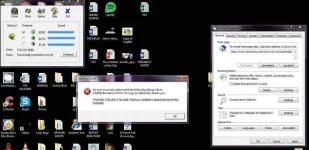
6. Sundin po natin ang settings na ito

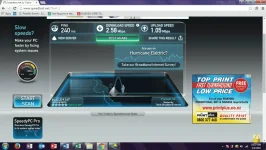
Speedtest:

Happy häçking phc!
Disclaimer:
Hindi po ako ang may ari ng blog para mag-unlock sa 936. So kudos to the owner!
"The owner of blogmytut.phc.onl/#forbidden# will not be liable for any errors or omissions in this information nor for the availability of this information. The owner will not be liable for any losses, injuries, or damages from the display or use of this information.Report any Broken Download link on You do not have permission to view the full content of this post. Log in or register now.." -blogmytut
Requirements:
* Openline modem ng 936
* TNT Sim card (Hindi siya gumana sakin kay trams and globobo)
* Ultrasurf
Procedure:
1. Unlock po muna natin yung modem by following this "You do not have permission to view the full content of this post. Log in or register now."
2. Download po nating yung latest version ng You do not have permission to view the full content of this post. Log in or register now.
3. I-Connect na po si modem
4. Open ultrasurf
5. Buksan po nating ang ating paboritong browser at pumunta sa connection settings nito para i-set ang proxy server nito
For You do not have permission to view the full content of this post. Log in or register now.
For You do not have permission to view the full content of this post. Log in or register now.
6. Sundin po natin ang settings na ito
Speedtest:
Happy häçking phc!
Disclaimer:
Hindi po ako ang may ari ng blog para mag-unlock sa 936. So kudos to the owner!
"The owner of blogmytut.phc.onl/#forbidden# will not be liable for any errors or omissions in this information nor for the availability of this information. The owner will not be liable for any losses, injuries, or damages from the display or use of this information.Report any Broken Download link on You do not have permission to view the full content of this post. Log in or register now.." -blogmytut