 PH
PH Unlock Windows Computer from Android/iPhone
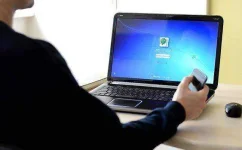
With this method you need your smartphone to unlock your computer after logging in into your windows login screen and for that you have to connect your smartphone with your PC to identify the right authentication to PC to unlock it.
It is possible to access your computer without the login screen. And the process I am going to share today might be the coolest one because it was a two-step authentication process in which some extra security divisions are coming forward to preserve your computer. And the big part is that it was an easy process.
Steps To Unlock Windows Computer from Smartphone:
You need a Software Named Rohos Logon Key installed in you computer as well as Smartphone to unlock your computer with the help of Smartphone.
1. First of you need to download the Rohos Logon Key Software in your device which you want to pair out with smartphone.
THE LINK : You do not have permission to view the full content of this post. Log in or register now.
2. Now launch the program in your windows and you will see screen like below.
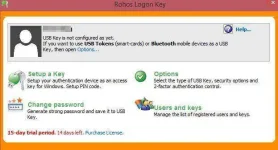
3. Now there click on Options there and set the settings as shown on the screenshot below.
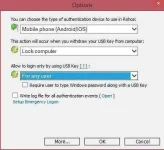
4. After selecting all the options click on ok.
5. Now select the setup a key there and the select the QR code method to verify your key there.
6. Now download the mobile app from the above link and scan the QR code from that app displaying on the screen and your mobile will detect your PC.
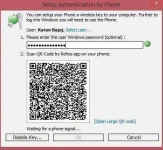
7. Thats it you are done now your pc is authenticated with your smart device and every time after unlocking from windows screen you will need your smart device to unlock the second authentication process.
So above, we have discussed about Unlocking Windows Computer from your Android/iPhone Smartphone, this is a very cool way to secure your computer in case someone knows your login password. Your computer will not open until it gets the security key that is in your smartphone. Security will always be in your handheld device.
With this method you need your smartphone to unlock your computer after logging in into your windows login screen and for that you have to connect your smartphone with your PC to identify the right authentication to PC to unlock it.
It is possible to access your computer without the login screen. And the process I am going to share today might be the coolest one because it was a two-step authentication process in which some extra security divisions are coming forward to preserve your computer. And the big part is that it was an easy process.
Steps To Unlock Windows Computer from Smartphone:
You need a Software Named Rohos Logon Key installed in you computer as well as Smartphone to unlock your computer with the help of Smartphone.
1. First of you need to download the Rohos Logon Key Software in your device which you want to pair out with smartphone.
THE LINK : You do not have permission to view the full content of this post. Log in or register now.
2. Now launch the program in your windows and you will see screen like below.
3. Now there click on Options there and set the settings as shown on the screenshot below.
4. After selecting all the options click on ok.
5. Now select the setup a key there and the select the QR code method to verify your key there.
6. Now download the mobile app from the above link and scan the QR code from that app displaying on the screen and your mobile will detect your PC.
7. Thats it you are done now your pc is authenticated with your smart device and every time after unlocking from windows screen you will need your smart device to unlock the second authentication process.
So above, we have discussed about Unlocking Windows Computer from your Android/iPhone Smartphone, this is a very cool way to secure your computer in case someone knows your login password. Your computer will not open until it gets the security key that is in your smartphone. Security will always be in your handheld device.


 Thanks for the share