 PH
PHDARKCLOUDS
Elite
Hi Guys! i just want to help somebody to resolve this problem same with me lately.
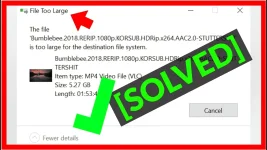
Just because yung Pen drive or Flash drive nyo is Formatted using FAT32
Solution 1:
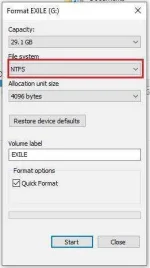
Format your Flashdrive (Be careful it will erase all your Files/Date on your Drive)
Set FAT32 into NTFS on File System
Solution 2:
Conversion using CMD
Type this code:

G: Stands for kung anong Drive Letter sya sayo
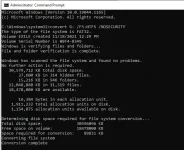
Actuall convertion kunno Hahaha
Just because yung Pen drive or Flash drive nyo is Formatted using FAT32
Solution 1:
Format your Flashdrive (Be careful it will erase all your Files/Date on your Drive)
Set FAT32 into NTFS on File System
Solution 2:
Conversion using CMD
Type this code:
G: Stands for kung anong Drive Letter sya sayo
Actuall convertion kunno Hahaha