 PH
PHXxAccursedxX
Honorary Poster
Spread awareness tau mga lodi para nmn hindi ma-abuso ang mga ovpn configs natin dito.
Link: You do not have permission to view the full content of this post. Log in or register now.
Step 1:
Add the following lines before
It should look like this and then press the play button
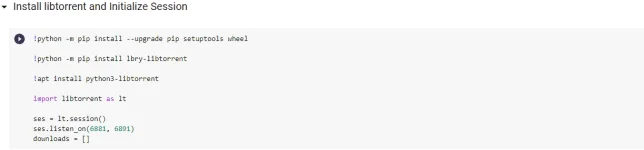
Step 2:
After installing, link your GoogleAccount (Not your personal one for security reasons)

Step 3.1:
Select "Add From Torrent File" if you have the .torrent file
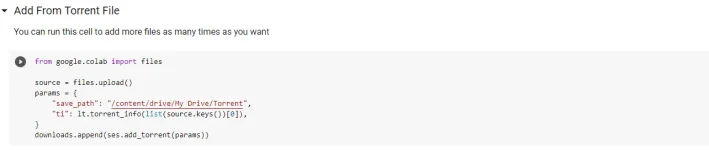
Step 3.2:
"Add Magnet Link" if it came from a website
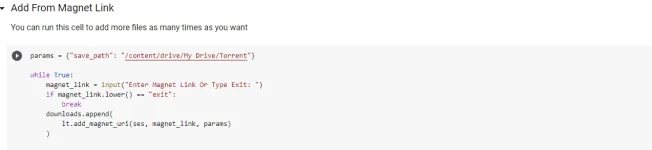
Last step:
This one should appear at the bottom part

The file will be downloaded to their server, no data is consumed but persistent internet connection is req., which you can download again from your drive to your pc.
Note when downloading files from your drive to your PC: (exceptions to those who have lots of storage left on their account)
-Do not download from your google drive on another tab , instead download from the folder icon in the left tab as shown in the image below.

-Avoid 3rd party software downloaders eg. IDM, JDownloader2 etc.
Additional Notes (free users):
-Each runtime have a validity of 12 hours per account, in that time, you need to finish downloading everything to their server. Anymore than that, your torrent and all your downloads will stop. You can still switch you runtime to "none" although I haven't really tried if it resumes your progress or not.
And that's it, enjoy...
Link: You do not have permission to view the full content of this post. Log in or register now.
Step 1:
Add the following lines before
Code:
!apt install python3-libtorrent
Code:
!python -m pip install --upgrade pip setuptools wheel

!python -m pip install lbry-libtorrentStep 2:
After installing, link your GoogleAccount (Not your personal one for security reasons)
Step 3.1:
Select "Add From Torrent File" if you have the .torrent file
Step 3.2:
"Add Magnet Link" if it came from a website
Last step:
This one should appear at the bottom part
The file will be downloaded to their server, no data is consumed but persistent internet connection is req., which you can download again from your drive to your pc.
Note when downloading files from your drive to your PC: (exceptions to those who have lots of storage left on their account)
-Do not download from your google drive on another tab , instead download from the folder icon in the left tab as shown in the image below.
-Avoid 3rd party software downloaders eg. IDM, JDownloader2 etc.
Additional Notes (free users):
-Each runtime have a validity of 12 hours per account, in that time, you need to finish downloading everything to their server. Anymore than that, your torrent and all your downloads will stop. You can still switch you runtime to "none" although I haven't really tried if it resumes your progress or not.
And that's it, enjoy...