PH
PHblackhawk2015
Fanatic
Requirements: tutorial na yan mga ka ph free na yan
1. log in to you're GUI
2.Click Status then WAN
3. Copy Unique IP Adress
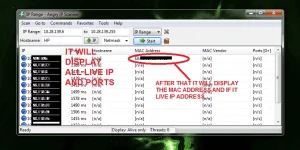
4.Open Angry Ip Scanner Run as Administrator
5.After copying your ip address from your GUI paste this to the ANGRY IP ADDRESS SCANNER
6.Then Set the end range to 255
Example:
10.26.164.2 - Starting Range
10.26.164.255 - End Range
7.Then Click the start button
time depends on the speed of your PC..
- -must be connected to network Wimax, LTE, 3G, 4G
- -telnet must be open
- -download Angry ip Scanner
1. log in to you're GUI
2.Click Status then WAN
3. Copy Unique IP Adress
4.Open Angry Ip Scanner Run as Administrator
5.After copying your ip address from your GUI paste this to the ANGRY IP ADDRESS SCANNER
6.Then Set the end range to 255
Example:
10.26.164.2 - Starting Range
10.26.164.255 - End Range
7.Then Click the start button
time depends on the speed of your PC..