 PH
PH
About 60-70% of people in the world are utilizing smartphones. But many of them encounter a problem with battery reinforcement. Most of the smartphones like android consume much battery as compared to others. As a result, in conventional condition Android battery dies in about 6-7 hours. Many of us use battery booster app for Android, But they leave no noticeable signs to depend on. That’s why I’m posting this to determine the issue of less battery backup of Android.
In this post, I will tell you some methods to increase battery backup of your android with this battery booster technique. By this, your android battery life will get boosted and you can appreciate a lengthy enduring battery backup.
How To Increase Battery Life Of Your Android Smartphone ( 2 Methods )
#1 Method – Without any app (By Adjusting Animation scales)
In this method, I will tell you a very simple method to increase battery backup of android without any app. This method will work on almost every android phone.
Steps to Increase Battery backup of Android:
Step 1. Open Settings on your android device. Now Scroll Down And click on About Phone. Now you will see an options build number there. Tap 7-10 Times on the build number and you see developer options will get activated.
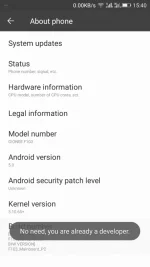
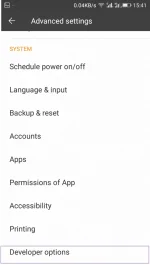
Step 2. Now get back to settings and a new option Developer Option will get added there . Click on Developer Option and scroll down.
Step 3. You will see options Window Animation scale, Transition Animation Scale, and Animation Duration Scale. Now By default, their value would be 1.0, Set them to 0.5 or off them all.
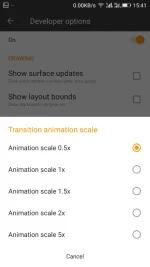
That’s it, you are done this will Increase your battery backup of Android up to 30-40%.
#2 Method: Using Greenify App
After having root privilege to your android phone, you can boost battery power of android with this app. Greenify app just hibernate the apps which are not currently in use. But this is not as same as the common hibernating apps as in this app there is also cache stored which will not let the app stop completely. By hibernating apps, the workload of background running apps on battery gets reduced too in many extents and your battery backup gets boost
Requirements :-
A rooted Android
Steps to Increase Battery Backup Of Android Using Greenify App:
Step 1. Download and Install Greenify app from the Google play store.

Step 2. Now open the app and grant it the superuser access. Now you will see three option on the app you just have to click on hibernate icon that is located on the right down corner
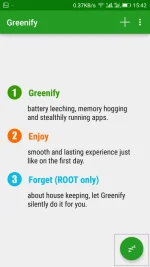
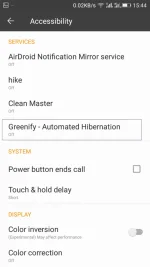
Step 3. Now you will be asked to enable the grennify app as your default services. Select it and turn it on. That’s it, you are done, now this app will automatically hibernate that app when they are not in use and saves a lot of battery of your android.
How To Increase Battery Life Of Android– With these two methods you can undoubtedly boost up your battery life of android at approximately 40-50%. Hope you like the post. Also, Leave a comment as a feedback of your experience with these methods.


