 PH
PHLove windows 11 but hate the new features and UI options?
Eto nakita ko solusyon kung hate nyo yung bagong pa-istayl ng windows 11 sa right click context menu at sa taskbar na by default eh "always combine" yung icons
balik natin sa windows 10 style using this tool
According to microsoft, aayusin daw nila yan sa upcoming updates pero di na ako makahintay, until they fix the issue(s) dito na lang muna tayo sa tool na eto.
NOTE: Di ko pa sya na-explore thoroughly, yun lang kasi context menu at taskbar ang main concern ko kaya tumigil na ako dun.
Eto yung tool: You do not have permission to view the full content of this post. Log in or register now.
Double click lang to install and if you find na di nyo bet yung tool, pwede nyo uninstall using the same set-up file, double click lang ulit or pwede rin naman sa uninstall program sa control panel, di ko pa nasubukan but at least yun ang sabi sa documentation sa source sa You do not have permission to view the full content of this post. Log in or register now. <<<
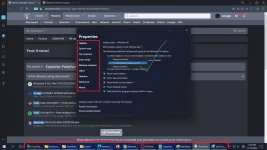
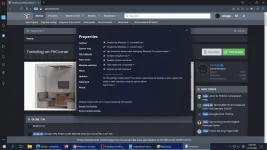
After installation, right click nyo lang yung task bar nyo select Properties para lumabas ang option
Eto yun, take a look at my taskbar guys, wala na auto-grouping yung icons....... just the way I like it!
Kayo na bahala tumuklas kung ano pa pwede ayusin dyan.
Enjoy!
Eto nakita ko solusyon kung hate nyo yung bagong pa-istayl ng windows 11 sa right click context menu at sa taskbar na by default eh "always combine" yung icons
balik natin sa windows 10 style using this tool
According to microsoft, aayusin daw nila yan sa upcoming updates pero di na ako makahintay, until they fix the issue(s) dito na lang muna tayo sa tool na eto.
NOTE: Di ko pa sya na-explore thoroughly, yun lang kasi context menu at taskbar ang main concern ko kaya tumigil na ako dun.
Eto yung tool: You do not have permission to view the full content of this post. Log in or register now.
Double click lang to install and if you find na di nyo bet yung tool, pwede nyo uninstall using the same set-up file, double click lang ulit or pwede rin naman sa uninstall program sa control panel, di ko pa nasubukan but at least yun ang sabi sa documentation sa source sa You do not have permission to view the full content of this post. Log in or register now. <<<
After installation, right click nyo lang yung task bar nyo select Properties para lumabas ang option
Eto yun, take a look at my taskbar guys, wala na auto-grouping yung icons....... just the way I like it!
Kayo na bahala tumuklas kung ano pa pwede ayusin dyan.
Enjoy!